Choose an AI Teammate That Fits How Your Team Works
A long feature list rarely tells a small team whether an AI tool will help on Monday morning. The better question is whether it can handle your real work, within your budget, without creating a new maintenance project. These Lindy AI alternatives offer different answers to that challenge.
Quick Answer
Six alternatives are LaunchLemonade, AI by Zapier, Make, n8n, Relevance AI, and Gumloop. Compare Lindy AI alternatives by workflow fit, setup effort, oversight, and total usage costs. LaunchLemonade suits teams seeking assistants built with plain-English instructions. Workflow-focused tools may suit teams prioritising complex app connections.
Summary
Small teams should compare AI agent tools using the same work sample, permissions, and review process. LaunchLemonade is an AI agent platform for professionals and small teams who build assistants using plain-English instructions. Other options place different emphasis on workflow automation, agent configuration, or technical control.
What This Guide Covers
- What Lindy offers and why a team might consider a change.
- Six alternatives, with strengths, limitations, and likely best fits.
- A practical scorecard for testing cost, oversight, and everyday usability.
What Are Lindy AI Alternatives?
Lindy AI alternatives are AI agent or automation tools that help teams complete tasks using instructions, connected information, or workflows. Some emphasise conversational assistants, while others focus on connecting applications or building multi-step processes. The right choice depends on the work you want to delegate and who will maintain it.
Lindy’s pricing page describes a workspace assistant with meeting, inbox, scheduling, and connected-app capabilities. As of November 2026, Lindy lists paid usage from $29.99 per active user monthly, with a shared credit pool. Monthly credits do not roll over, according to the page.
That starting point matters because an alternative does not need to reproduce every Lindy feature. A team that mainly needs internal document answers has different requirements from one that needs calendar scheduling or CRM updates.
Why Might a Small Team Look Elsewhere?
A switch can be sensible when the tool’s strongest capabilities do not match the team’s most valuable work. Common reasons include:
- Workflow fit: The team needs a different balance of chat, document-based answers, and automation.
- Ownership: One person must be able to build and maintain the setup.
- Cost predictability: The team wants to understand seats, usage, top-ups, and overages.
- Oversight: A manager needs clear boundaries around external actions.
- Technical flexibility: The team needs more control over workflow design or deployment.
Lindy may remain the better choice if its meeting and inbox experience already fits your needs. Compare the cost of switching, including rebuilding instructions and reviewing access, before making a decision.
How We Compared the Options
This is an editorial comparison based on official documentation and LaunchLemonade’s available knowledge-base information. It is not a hands-on test or a ranking based on customer outcomes.
Each option is considered against the same criteria:
- The work it is designed to support.
- Who can reasonably build and maintain it.
- Its approach to connected workflows and team use.
- Pricing and usage considerations.
- Practical limitations and oversight requirements.
Features, plan entitlements, and prices can change. The comparison reflects the sources available in November 2026, except where LaunchLemonade information is undated and marked for rechecking.
Which Six Options Suit Different Small-Team Needs?
The six options below cover assistant building, visual automation, workflow control, and more specialised agent setups. No single product leads on every criterion. Use the table to create a shortlist, then test each candidate against the same task, access requirements, and budget before committing.
Tools at a Glance
| Tool | Best For | Key Strength | Key Limitation | Starting Price | Best Fit |
|---|---|---|---|---|---|
| LaunchLemonade | Shared assistants using team knowledge | Plain-English assistant building | Team features and minimum seats need plan review | Check current pricing | Non-technical professional teams |
| AI by Zapier | AI inside connected workflows | AI steps work alongside Zap logic | Task consumption varies by run | Check current pricing | Teams already using Zapier |
| Make | Visual, multi-app automation | Agents and workflows share a visual canvas | Complex scenarios still need maintenance | Check current pricing | Operations teams comfortable with visual flows |
| n8n | Configurable agents and workflows | Cloud and self-hosted options | Agent feature is in preview | Check current pricing | Teams with technical ownership |
| Relevance AI | Coordinated agent work | Agent configuration and testing options | Plan and usage structure needs review | Check current pricing | Teams managing several agent roles |
| Gumloop | Shared agents and recurring tasks | Agents can run through chat or triggers | Credit usage and access need review | Check current pricing | Teams wanting shared agent workflows |
Starting price is not the same as the cost of a realistic team setup. Ask each vendor for the plan, seats, and usage allowance needed for your actual pilot.
1. LaunchLemonade: Shared Assistants Built Around Team Work
LaunchLemonade is an AI agent platform for professionals and small teams who build assistants using plain-English instructions. Its knowledge-base description says users can add their own knowledge and share assistants with colleagues.
For a professional team, that approach can suit repeated work such as preparing research, drafting documents, or answering questions from approved material. A team can start with a narrow assistant rather than rebuilding an entire business process at once.
Strengths
- Plain-English assistant creation is intended for non-technical users.
- Team knowledge and instructions can be attached to assistants.
- The knowledge base describes team access controls and approval workflows on relevant plans.
Limitations
- The knowledge base describes a five-seat minimum for Team plans. Check current pricing and eligibility before budgeting.
- Custom integrations are not yet built through the UI, according to the available knowledge-base entry.
- Model availability and governance features vary by plan. Check current availability before choosing.
LaunchLemonade may be less suitable if a very small team needs only a single-purpose automation and has no need for shared assistants. It may also require a conversation with the team if a required custom connection is not available.
Explore the LaunchLemonade builders platform if you want to assess the assistant-building approach. Confirm the specific data sources and permissions your intended workflow needs.
2. AI by Zapier: AI Inside Existing Automation
AI by Zapier is a strong candidate when the team already uses Zaps to move information between applications. Zapier’s migration documentation says agent reasoning and tool calling now sit inside an AI by Zapier step in the Zap editor.
That means a team can combine an AI step with more predictable workflow steps. For example, an AI step might classify a request, while a fixed step routes the result to an agreed destination.
Strengths
- AI steps can sit alongside triggers, filters, and other Zap logic.
- Zapier documents per-tool approval settings and run history for reviewing agentic work.
Limitations
- Task usage depends on factors including tools, model tier, and the steps used.
- A team must understand Zap triggers and actions, even if the AI portion uses natural language.
- Migrating an older Zapier Agent deserves testing, especially when knowledge sources differ.
Zapier’s documentation says the company is migrating Agents to AI by Zapier. As of November 2026, the same documentation says no shutdown date has been set. Check the current migration guidance before relying on that status.
3. Make: Visual Workflows With Agent Decisions
Make suits teams that want to see how applications and decision points fit together. Its AI Agents page describes a visual canvas that combines AI decisions with workflow logic.
That can be useful when a process crosses several systems. A team can map the predictable handoffs and reserve AI for the part requiring interpretation, such as categorising an incoming request.
Strengths
- The visual approach makes workflow paths easier to inspect.
- Make describes a reasoning panel for reviewing agent decisions.
- The same environment supports both AI and fixed workflow logic.
Limitations
- A visual workflow still needs an owner to maintain connections, error handling, and changes.
- Credit consumption varies with the actions and AI features used.
- A simple assistant request can become over-engineered if the team builds a large scenario too early.
Make is worth shortlisting when the workflow itself is the main problem. It may be less attractive when the team wants a straightforward shared assistant and does not need a multi-app scenario.
4. n8n: Configurable Agents With Technical Ownership
n8n is worth considering when a team wants configurable workflows and has someone comfortable managing them. Its documentation describes agents alongside workflows, with cloud and self-hosted availability.
The distinction between an agent and a fixed workflow is useful. An agent can decide which configured tools to use, while a workflow can keep a known sequence explicit.
Strengths
- Teams can combine agent behaviour with configurable workflows.
- The documentation describes cloud and self-hosted options.
- Agents can use configured tools and knowledge bases.
Limitations
- As of November 2026, n8n describes its agent feature as Preview. Behaviour may change.
- Self-hosting adds operational responsibility, including deployment and maintenance.
- Technical flexibility can require more configuration than a small non-technical team wants.
n8n is a better fit when control is valuable enough to justify that ownership. It is less suitable when nobody has time to maintain the environment or investigate failed runs.
5. Relevance AI: Multiple Agent Roles
Relevance AI focuses on building and coordinating agents, tools, and workflows. Its feature documentation describes agent handoffs, testing, approvals, and integrations.
This can suit a team that wants separate responsibilities for different agents. For example, one agent might prepare a research brief while another formats it for review. That is a design possibility, not a promise that every task should be split between agents.
Strengths
- The feature list includes agent coordination and testing capabilities.
- Relevance AI describes per-action approval and human escalation options.
- Teams can use a no-code builder for agents and workflows.
Limitations
- Multiple agents add complexity to instructions, ownership, and troubleshooting.
- Actions, vendor credits, users, and plan entitlements need separate review.
- Some capabilities are plan-specific, so the feature list alone is not a plan guarantee.
Relevance AI can be useful when multiple agent roles are a real requirement. If one assistant can perform the work reliably, a simpler setup may be easier to maintain.
6. Gumloop: Shared Agents for Recurring Tasks
Gumloop’s documentation describes agents that teams can build, share, and run through chat or triggers. Each task has its own conversation history, files, and credit usage.
That makes Gumloop relevant to teams that want an agent for a recurring job, such as preparing a brief or sorting incoming work. The key question is whether the specific app access and review process fit the team’s needs.
Strengths
- Agents can be shared and accessed by team members.
- Tasks can run through chat or configured triggers.
- Task history provides a place to review previous work.
Limitations
- Credit usage should be tested against realistic task volume.
- Shared access and connected tools need careful configuration.
- The pricing page did not expose enough readable detail during this review to verify a starting price. Check current pricing directly.
Gumloop may suit a team that values reusable agent tasks. It is less suitable if the required cost, permissions, or app connections cannot be confirmed before rollout.
How Do Costs Compare Across Lindy AI Alternatives?
Costs depend on more than the advertised monthly entry price. AI tools may charge for seats, tasks, credits, model usage, or a combination. A useful comparison estimates the cost of the same workload on each product, then checks what happens when the team reaches its allowance.
| Cost Question | Why It Matters | What to Ask |
|---|---|---|
| Who needs a paid seat? | A shared setup may cost more than a solo plan. | Are builders, reviewers, and occasional users billed differently? |
| What does one run consume? | A single job may involve several actions or model calls. | Can the vendor show usage for a representative task? |
| What happens at the limit? | Work may pause or continue with extra charges. | Is overage automatic, optional, or unavailable? |
| Are credits comparable? | Each vendor defines its own billing units. | What does the allowance cover, and when does it reset? |
| What else is required? | External models or services may add cost. | Are model, integration, or hosting fees separate? |
As of November 2026, Zapier’s pricing page describes a shared task pool. It also says accounts may move to pay-as-you-go after reaching a limit unless that setting is turned off or the plan is changed.
Make’s pricing page says most module actions consume a credit, while some advanced AI features may consume more. The page also describes options for buying extra credits. Confirm the settings for your plan before enabling automatic purchases.
Relevance AI’s pricing documentation lists Pro from $19 per month on annual billing and $29 per month on monthly billing, as of November 2026. The same page distinguishes Actions from Vendor Credits. Its displayed plan table contains some conflicting details, so confirm the applicable allowance with Relevance AI before purchasing.
Build a Workload Estimate, Not a Credit Conversion
Do not compare one vendor’s credit with another vendor’s task as if they were the same unit. Instead, define a representative workload:
- Number of people who will build, use, and review the assistant.
- Number of tasks expected in a typical week.
- Number of connected apps involved in each task.
- Expected document size and frequency of updates.
- Whether an external model, self-hosted environment, or extra service is required.
Run a small sample, record the vendor’s reported usage, and ask what would happen at a higher volume. A sample is not a guaranteed forecast, but it is more useful than comparing headline allowances alone.
Check LaunchLemonade Plan Fit
The available LaunchLemonade knowledge-base entry describes individual and Team plans, pooled Team credits, and a five-seat Team minimum. The entry does not provide a reliable freshness date for those prices.
Check current pricing and plan terms before making a comparison. Ask which users need seats, which controls are included, and how your expected model usage affects the allowance.
What Should Small Teams Check Before Switching?
A small team should check task quality, permissions, costs, and maintenance before moving from Lindy or adopting another agent tool. A promising demonstration is not enough. The real test is whether colleagues can complete a representative job safely, review the result, and recover when the process fails.
Use the Small-Team Fit Matrix
Score each shortlisted product from zero to two for each criterion. A score of zero means the requirement is unmet or unverified. One means it works with a meaningful caveat. Two means the team has verified that it meets the requirement.
| Criterion | Score 0 | Score 1 | Score 2 |
|---|---|---|---|
| Work fit | Cannot perform the core task | Performs part of the task | Handles the agreed task with acceptable review |
| Setup ownership | No one can maintain it | One person can maintain it with support | At least two people can manage routine changes |
| Access and oversight | Required controls are missing or unclear | Controls exist but need workarounds | Permissions and review points are confirmed |
| Cost visibility | Realistic cost is unknown | Some usage is measurable | Seats, usage, and limit behaviour are understood |
| Recovery | Failure is hard to identify | Failure is visible but manual recovery is unclear | A named owner can identify and recover from failure |
The highest total is not automatically the winner. Treat access and oversight as pass-or-fail if the task involves sensitive data or external actions.
For example, a product scoring well on ease of use should not proceed if the team cannot control access to the information it needs. Likewise, an inexpensive option is not a bargain if nobody can maintain it.
Separate Reading From Acting
An assistant that reads approved documents poses different practical risks from one that can send messages or change records. Map each capability before connecting an account.
Ask:
- What information can the assistant read?
- Which account grants that access?
- Can the assistant create, change, or delete anything?
- Where does a person review the result?
- How will the team discover an incorrect or failed action?
The US National Institute of Standards and Technology’s 2024 generative AI risk management profile is a voluntary resource for considering AI risks across the lifecycle. It is not a certification or a substitute for assessing a specific product.
Keep the First Pilot Narrow
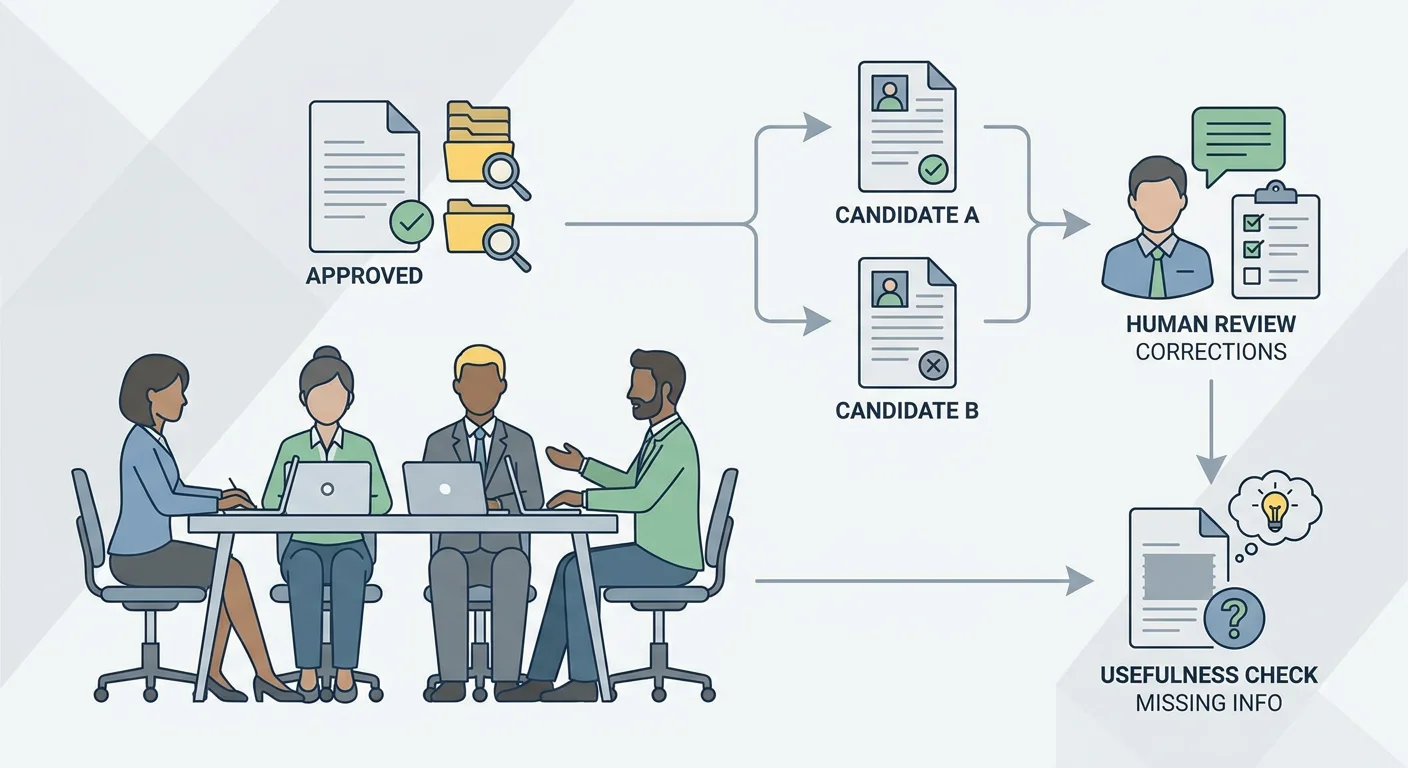
The first pilot does not need permission to send emails or edit a CRM. Once the team understands the quality and cost, it can decide whether an action is worth adding.
This example does not represent a real customer or measured result. Its purpose is to show how to limit the scope of a fair comparison.
How Do You Choose Lindy AI Alternatives for Your Team?
Choose a tool by defining one valuable task, testing candidates against the same material, and checking who will own the result. Include cost and permissions in the test rather than treating them as procurement details. A short pilot should leave you with a decision and a maintenance plan.
Step 1: Define One Job and Its Owner
Write down the input, expected output, and person responsible for reviewing it. Choose work that happens often enough to test, but does not require immediate external action.
For example, specify a research brief or document summary instead of asking the tool to “run operations.” A precise task makes results easier to compare.
Step 2: Shortlist by the Type of Work
Choose an assistant-oriented option if people mainly need to ask questions and draft from team knowledge. Choose a workflow-oriented option if the main requirement is moving information across several systems.
Include one option that fits your current way of working and one that offers a meaningfully different approach. Avoid building a long shortlist that the team cannot evaluate properly.
Step 3: Set Access and Approval Boundaries
Identify the documents, accounts, and actions needed for the pilot. Give access only to the information required for the task.
Decide which outputs a person must review. For external messages or record changes, confirm the product’s actual approval settings and test them before use.
Step 4: Run the Same Test Cases
Use the same instructions and representative inputs for each candidate. Include an incomplete request and a document that does not contain the answer.
Review whether the output is useful, whether missing information is acknowledged, and how much correction is required. Do not assume a confident answer is a correct one.
Step 5: Record Usage and Maintenance
Capture the reported credits or tasks, the seats required, and the time spent correcting or maintaining the setup. Ask the vendor how limits, renewals, and overages work for the relevant plan.
Also record who can update instructions, replace a connected account, and investigate an error. A tool that only one person understands can become a team bottleneck.
Step 6: Make a Conditional Decision
Use the fit matrix to compare the results. Eliminate options that fail a required access, oversight, or budget condition.
If two candidates meet the same requirements, favour the one your team can maintain. Review the decision again after the workload or team size changes.
Which Tool Should You Shortlist First?
The best starting point depends on whether the team needs a shared assistant, visual automation, technical control, or coordinated agents. Start with the smallest shortlist that covers your main job. Then use a common pilot to check the claims that matter for your own work.
| If You Need… | Consider | Why |
|---|---|---|
| Shared assistants built around team knowledge | LaunchLemonade | Plain-English assistant building and team sharing are central to its described use case. |
| AI inside existing Zap workflows | AI by Zapier | AI steps can be combined with Zap triggers and logic. |
| A visual map of multi-app workflows | Make | Agents and workflow logic sit in a visual environment. |
| More technical control and self-hosting | n8n | The documentation describes self-hosted and cloud options. |
| Several agent roles and handoffs | Relevance AI | Its feature list includes agent coordination and testing. |
| Shared agents for recurring tasks | Gumloop | Agents can be shared and run through chat or triggers. |
No row guarantees that a product supports every integration or approval requirement. Confirm those details with the vendor and test them in the plan you would actually buy.
Key Takeaways
- Lindy AI alternatives serve different jobs, from shared assistants to multi-app automation.
- Compare the same task across products instead of relying on feature lists.
- Check seats, usage units, reset rules, and overage behaviour before budgeting.
- Treat permissions and human review as requirements, not optional extras.
- Choose a setup your team can maintain after the pilot.
Conclusion
The most useful comparison is not “Which AI tool has the most features?” It is “Which tool can our team use, review, and maintain for the work that matters?”
Shortlist Lindy AI alternatives by the job first. Then test access, output quality, costs, and recovery using a small, realistic pilot.
If shared assistants built around team knowledge sound relevant, book a LaunchLemonade demo. Bring one representative task and your questions about seats, data access, and approval requirements.
Frequently Asked Questions
What Is the Best Alternative to Lindy for a Small Team?
The best Lindy alternative depends on the team’s task and technical capacity. LaunchLemonade is relevant for shared assistants built with plain-English instructions. Make or AI by Zapier may suit teams prioritising connected workflows.
Are There Free Alternatives to Lindy?
Some AI automation products offer free plans or trials, but their limits differ. LaunchLemonade’s knowledge base describes a free plan with one-off starter credits. Check current plan terms before assuming a free option supports your full workload.
How Much Do Lindy Alternatives Cost?
Lindy alternatives use different combinations of seats, credits, tasks, and model charges. A starting price rarely represents every team’s total cost. Check current pricing and test a representative workload before committing.
Is LaunchLemonade a Direct Replacement for Lindy?
LaunchLemonade may replace some Lindy use cases, but the products are not identical. LaunchLemonade focuses on assistants built with instructions and team knowledge. Confirm any meeting, inbox, or integration requirements before switching.
Which Option Is Best for Complex Workflows?
Make, n8n, and AI by Zapier are relevant options for teams comparing workflow automation. Each offers a different balance of visual design, configuration, and maintenance. Test the required integrations and failure handling before choosing.
Who Should Avoid a More Technical AI Tool?
A more technical AI tool may not suit a team without an owner for setup and maintenance. Self-hosted n8n, for example, adds deployment responsibilities. A simpler assistant may be more practical for a narrow task.
Can AI Agents Send Messages Without Review?
AI agent permissions depend on the product and its configuration. Some products offer approval settings for selected actions. Confirm and test those settings before connecting an account or enabling external messages.
Should We Replace Lindy Immediately?
A team should not replace Lindy solely because another tool has a longer feature list. Run a limited pilot and compare the actual task, cost, and oversight needs. Keep the existing process available until the replacement is ready.