Choosing Between Shared Assistants and Connected Workflows
A small team may need AI to answer questions, prepare work, or move information between apps. Those jobs can overlap, but they do not always call for the same setup. The choice depends on who will use the AI, what it must access, and whether a person or an automated event starts the work.
Quick Answer
LaunchLemonade vs Zapier Agents is a choice between two overlapping approaches to team AI. LaunchLemonade is worth considering for shared assistants built around team knowledge and instructions. Zapier is worth considering for AI steps embedded in connected app workflows. Zapier is migrating standalone Agents to AI by Zapier, so evaluate the newer experience too.
Summary
LaunchLemonade is an AI agent platform for professionals and small teams who build assistants by describing their work. Zapier’s agentic capabilities can run inside a Zap as an AI by Zapier step. Compare team access, app actions, review controls, and actual usage before choosing.
What This Guide Covers
- How the two products approach assistants and automated workflows.
- What Zapier’s migration means for a new purchase.
- How to compare collaboration, controls, and costs.
- A practical pilot and scorecard for a small-team decision.
What Is the Difference Between the Two Approaches?
The LaunchLemonade vs Zapier Agents comparison is a decision between AI assistants built for people and agentic capabilities embedded in workflows. Both can support team work, but their starting points differ. LaunchLemonade emphasises configurable assistants, while Zapier increasingly places agentic reasoning and actions inside its Zap editor.
LaunchLemonade is an AI agent platform for professionals and small teams who build assistants by describing their work. Its knowledge-base description covers assistants with their own instructions and knowledge, plus options for team sharing.
Zapier Agents and AI by Zapier are related but distinct experiences. Standalone Agents was built outside the main Zap editor. Zapier now describes a migration path into AI by Zapier, where an AI step can reason and use tools inside a Zap.
A useful way to frame the choice is:
- Assistant-led work: A person opens an assistant, supplies context, reviews an answer, and decides what happens next.
- Workflow-led work: An event starts a sequence, an AI step handles part of it, and other steps pass the result onwards.
Neither description is a hard boundary. LaunchLemonade also describes workflows, and Zapier Agents can be used interactively. The distinction helps identify which experience deserves the most attention in a pilot.
Start With the Work, Not the Product Category
Ask each teammate to name a task they repeat and show what starts it. A request such as “help me draft a client update” suggests a different experience from “when a form arrives, classify it and create a follow-up.”
That difference affects adoption. A shared assistant can be useful when teammates need to ask varied questions. A workflow can be useful when the trigger and downstream actions are consistent enough to define in advance.
The most important question is not whether one product is categorically better. It is whether the team can complete its real task reliably, with the right access and an acceptable amount of review.
How Do the Tools Compare at a Glance?
The LaunchLemonade vs Zapier Agents comparison should use the same criteria for both options: everyday use, collaboration, automation, controls, and cost. The table below is a starting point, not a verdict for every team. Confirm current plans and test the specific workflow before treating a listed capability as available to you.
| Tool | Best For | Key Strength | Key Limitation | Starting Price | Best Fit |
|---|---|---|---|---|---|
| LaunchLemonade | Configurable assistants used by professionals and teams | Assistant instructions, knowledge, and team sharing | Team plan minimum and current integration needs require checking | Check current pricing | Teams whose work starts with people using shared assistants |
| Zapier Agents and AI by Zapier | Agentic work connected to Zap workflows | AI steps can use tools within a broader Zap | Migration and task-based usage require planning | Check current pricing | Teams whose priority is a defined workflow across connected apps |
LaunchLemonade: Strengths and Limitations
What it does: LaunchLemonade lets users build AI assistants using plain-language instructions. Its knowledge base describes adding knowledge and sharing assistants with a team.
Who it suits: Consider LaunchLemonade when colleagues need a shared starting point for recurring research, writing, reporting, or internal questions.
Strengths:
- Assistants can be shaped around instructions and knowledge relevant to a team’s work.
- Team plans are described as supporting shared assistants, roles, and approval of assistants for sharing.
Limitations:
- The available knowledge base describes a five-seat minimum for Team plans. Check current pricing and eligibility if your team is smaller.
- The knowledge base says custom integrations are not yet built in the interface. Check current availability for every app and action your workflow requires.
The second limitation does not mean LaunchLemonade has no integrations. It means a buyer should test the specific connection rather than assume that a named app, trigger, or action is available.
Zapier Agents and AI by Zapier: Strengths and Limitations
What it does: AI by Zapier adds an AI-powered step to a Zap. With eligible settings, that step can use tools and return fields to later workflow steps.
Who it suits: Consider Zapier when the team’s priority is passing information among connected apps through a defined automation.
Strengths:
- AI steps can sit alongside other Zap actions, allowing teams to combine reasoning with more predictable workflow steps.
- Teams can configure tool approvals and review runs in Zap history.
Limitations:
- As of November 2026, standalone Agents is migrating. Existing users should check what changes for their agents and knowledge sources.
- AI model tiers and tool calls affect task usage. A workflow that works technically may still need cost controls.
Zapier also says its Free plan cannot publish a Zap containing an AI by Zapier step or add tools to that step. Check current availability before assuming a free pilot can reproduce the production workflow.
Which Option Is Better for Collaboration?
LaunchLemonade and Zapier both describe ways for teams to share AI-related work, but sharing can mean different things. A team may need to share an assistant, edit a workflow, or grant access to an app connection. Evaluate each permission separately, rather than assuming that one shared link covers every collaboration need.
Sharing an Assistant
LaunchLemonade’s knowledge base describes a team process in which members suggest assistants for sharing and an admin approves or rejects them. It also describes roles for admins, managers, and members. Check current availability and permissions for the plan you intend to use.
Zapier’s standalone Agents sharing guide says eligible members of a Team or Enterprise Zapier account can be given viewer or editor access. A viewer can use and chat with an agent, while an editor can also change instructions, tools, and connections.
As of November 2026, those are descriptions of standalone Agents sharing. They should not be assumed to map directly to every AI by Zapier workflow after migration. Check the sharing experience for the asset your team will actually use.
Sharing a Workflow and Its Connections
A colleague may be able to see a workflow without having everything needed to maintain it. For example, editing a step can depend on access to the connected app account.
Zapier’s app connection guidance says connections are private by default. In eligible team accounts, sharing a connection can let others use it in workflows without receiving the underlying login credentials.
That access still matters. A shared connection can let a colleague access or update information through a workflow. Give access only to people who need it, and review what happens when the connection owner leaves.
Questions to Ask Both Vendors
| Collaboration Question | Why It Matters |
|---|---|
| Can a teammate use the assistant without editing it? | Regular users may not need builder permissions. |
| Who can change instructions or connected tools? | Changes can affect everyone using the asset. |
| Can ownership be transferred? | A workflow should not depend indefinitely on one employee. |
| What can a shared connection read or change? | Workflow access can expose more data than the user expects. |
| Is sharing included in the proposed plan? | A solo plan may not cover the intended team experience. |
For either option, use the answers to define three roles: the person who uses the asset, the person who maintains it, and the person who approves sensitive changes. One person may hold multiple roles in a small team, but the responsibilities should still be explicit.
What Does Zapier’s Agents Migration Mean for Buyers?
The LaunchLemonade vs Zapier Agents decision now requires a migration check. As of November 2026, Zapier says standalone Agents is moving to AI by Zapier inside the Zap editor. Zapier has not announced an Agents shutdown date, so buyers should assess both their current setup and the intended destination.
If You Are Starting From Scratch
Ask Zapier which experience it recommends for your use case and account. Then evaluate the AI by Zapier workflow you would maintain, rather than relying solely on older standalone Agents examples.
In a Zap, an AI step can receive information from earlier steps and return structured fields for later steps. It can also use eligible tools. That creates useful flexibility, but it means the team needs someone who understands the whole workflow, not just the AI prompt.
Check four points before committing:
- The trigger your team needs.
- The app actions and accounts the AI step must access.
- The review needed before information is sent or changed.
- The task usage expected at normal and busy volumes.
If You Already Use Standalone Agents
Do not treat migration as a simple rename. Zapier’s migration best-practices guide says the two experiences do not support exactly the same knowledge sources. It recommends checking retrieval results, connection permissions, and run logs before turning off the original agent.
A useful migration test uses the same inputs in both experiences. Compare the returned information, any tool actions, and the final output. A successful run is not enough if the migrated workflow misses a source or changes the result.
Also record who owns the original agent. A replacement workflow needs an owner who can investigate failures, update connections, and review costs after migration.
What About LaunchLemonade?
If a team is also evaluating LaunchLemonade, use the migration as an opportunity to revisit the underlying job. The team may still need the same automated app actions. Or it may discover that several colleagues primarily need a shared assistant for research and drafting.
Either outcome is valid. The right comparison is the proposed future workflow against the team’s actual requirements, not an old feature list against a product name.
How Do Automation, Controls, and Costs Compare?
LaunchLemonade and Zapier use different approaches to usage and workflow management, so a headline price alone cannot establish the cheaper choice. Compare the plan needed for collaboration, the expected volume of work, connected tools, and review time. Then run a representative pilot and inspect both spending and maintenance effort.
Automation and Human Review
LaunchLemonade’s knowledge base describes structured workflows with multiple steps, tool calls, decision points, and scheduled or manual triggers. It also describes action approvals and team-level controls. Check current availability for the specific plan and workflow you intend to use.
Zapier’s tool configuration guide says an AI by Zapier step can use selected app actions and knowledge tools. Teams can enable approval before a tool runs. The approval toggle is off by default, so a team should deliberately configure it for sensitive actions.
A practical distinction is whether the AI is recommending an action or executing it. Drafting a reply for a person to review usually has a different risk from sending the reply or changing a customer record.
Pricing Requires More Than a Seat Comparison
The available LaunchLemonade knowledge base describes team credits pooled across seats and a minimum number of seats. It also describes usage in terms of AI model tokens. The source is undated, so check current pricing, credit rules, and plan terms before calculating a budget.
As of November 2026, Zapier’s pricing page describes shared account task allocations and plans with different collaboration features. Task needs can vary with the workflow and AI model tier. Check current pricing for the required plan, billing term, and task allocation.
For existing standalone Agents, Zapier’s Agents usage guide describes an activity-based allowance. That is not the same unit as the task-based system used by AI by Zapier. Avoid comparing an activity quota directly with a credit or task quota.
A Worked Task-Usage Example
Zapier’s model-tier pricing guide describes different task multipliers. As of November 2026, its examples include Advanced at three times the base rate and Premium at five times the base rate.
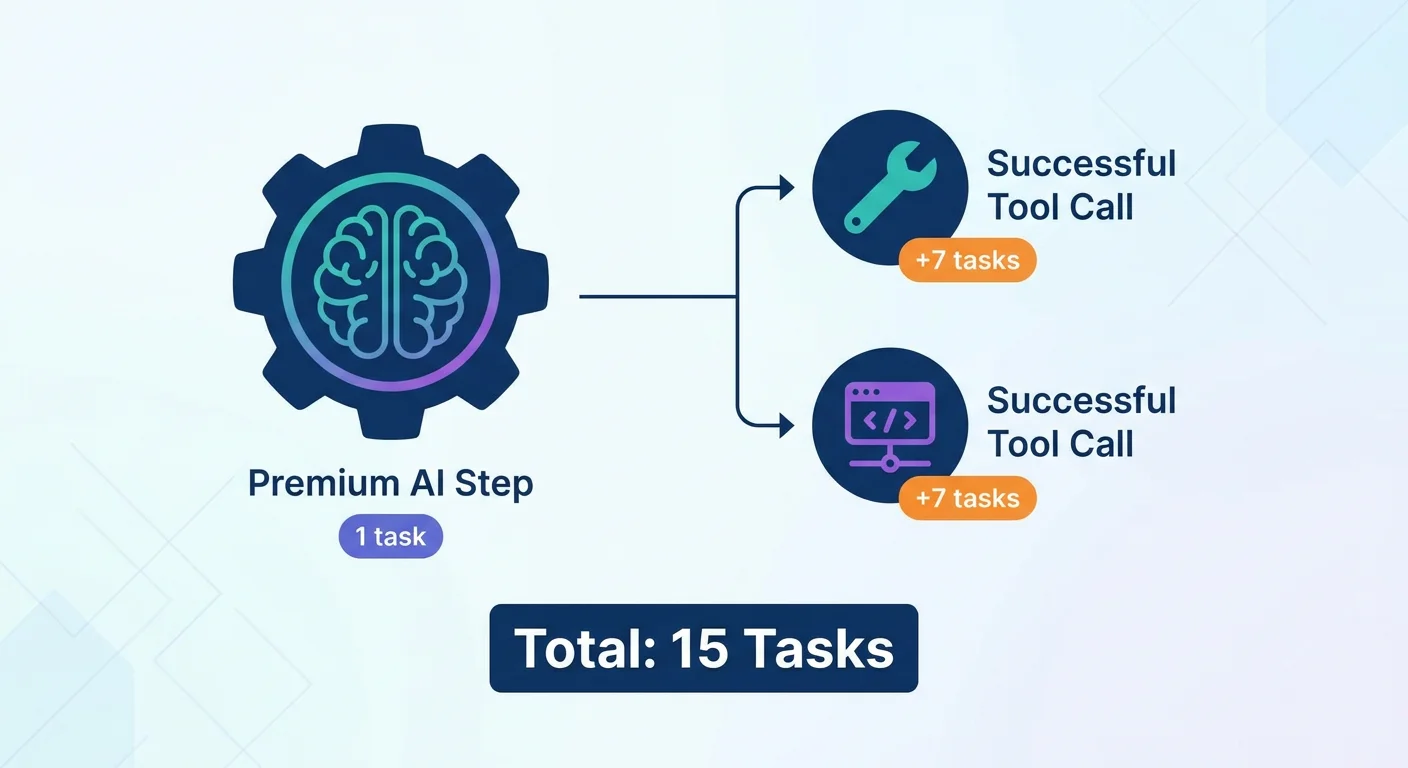
This example is not a quote for a customer’s workflow. Actual usage depends on model selection, tool calls, other steps, plan terms, and execution patterns. If a team brings its own AI account, it should also account for charges from that provider.
| Cost Question | LaunchLemonade | Zapier |
|---|---|---|
| What must we buy for collaboration? | Check current Team plan, seat minimum, and included credits. | Check current plan and sharing requirements. |
| What drives usage? | The knowledge base describes model-token usage. | AI tier, tool calls, and other workflow actions can affect tasks. |
| Can one busy workflow affect colleagues? | Check how the shared credit pool is managed. | Check the shared task allocation and usage controls. |
| What else belongs in the budget? | Setup, review, integrations, and maintenance. | Setup, review, connected services, provider charges where applicable, and maintenance. |
Data Access and Governance
LaunchLemonade’s knowledge base describes Team roles, assistant-sharing approvals, model governance, and an optional PII protection feature. It says PII protection covers prompts and user input, not knowledge indexing or logs. Check current availability and scope before making a procurement decision.
Zapier’s migration guide describes account-level controls and approval options for agentic workflows. Its tool guide also explains per-tool approval. Availability may depend on plan and configuration.
Neither a permissions list nor an approval toggle proves that a particular workflow is safe. Before using real client or employee information, review the data path, app permissions, retention terms, and access rights with the people responsible for that data.
How Can a Small Team Choose Between the Options?
A small team can compare LaunchLemonade vs Zapier Agents by testing one representative task against the same criteria in both products. Define the input, expected output, permitted actions, and reviewer first. Then score the pilot for usefulness, collaboration, control, cost, and maintenance rather than choosing from feature lists alone.
Step 1: Define One Representative Task
Choose a task that happens often enough to matter and has a clear owner. Write down what starts the work, what information is needed, and what a useful result looks like.
Avoid beginning with a vague goal such as “automate operations.” A narrower task, such as preparing a draft from an approved brief, makes the comparison easier to judge.
Step 2: Separate Answers From Actions
List what the AI should produce and what it may change. For example, drafting a message is an output; sending it is an action.
Mark each action as read-only, update, create, send, or delete. Decide which actions require a person’s approval before the pilot starts.
Step 3: Check Team and App Access
Identify the people who must use, edit, and approve the assistant or workflow. Check the relevant plan and verify that each person can access the required assets and connections.
Use test data where possible. If a live app connection is essential, limit its permissions to the scope needed for the pilot.
Step 4: Run the Same Test Cases
Prepare several normal cases and at least one incomplete or ambiguous case. Use the same source material and success criteria for both options where the workflows allow it.
Record the output, corrections, failures, and time spent reviewing. Do not count a run as successful merely because it completed.
Step 5: Estimate the Operating Model
Ask each vendor for current pricing based on the team’s seat count and expected usage. Include connected service charges, internal maintenance, and the cost of human review.
For Zapier, inspect task usage in the workflow history. For LaunchLemonade, check current credit usage and plan terms. Neither figure can be directly converted into the other without a representative workload.
Step 6: Score the Results and Assign an Owner
Use the scorecard below after the pilot. Give each criterion a score from 0 to 2: 0 means it does not meet the requirement, 1 means it partly meets it, and 2 means it meets it.
| Criterion | What to Check | Score |
|---|---|---|
| Output quality | Was the result useful and accurate enough after review? | 0 to 2 |
| Team usability | Could intended users access and use it without unnecessary help? | 0 to 2 |
| Workflow fit | Did it handle the required trigger, knowledge, and actions? | 0 to 2 |
| Control | Could the team restrict access and review sensitive actions? | 0 to 2 |
| Operating effort | Were cost, ownership, and maintenance acceptable? | 0 to 2 |
A total can help organise discussion, but it should not override a mandatory requirement. If a product cannot support a required approval or integration, resolve that gap before selecting it, even if its other scores are high.
For workflow handover, Zapier’s collaboration guidance recommends documenting and maintaining shared work. Apply the same discipline to either option: name an owner, record the purpose, and agree who responds when something fails.
Suggested Visual: A simple scorecard showing the five pilot criteria, with a separate pass or fail check for mandatory requirements.
Which Option Fits Your Team’s Priorities?
LaunchLemonade may be the better starting point when people need shared assistants shaped around their knowledge and instructions. Zapier may be the better starting point when a connected workflow and its app actions are central. Some teams may use both, but should justify the additional cost and maintenance before adding another product.
| If You Need… | Consider | Why |
|---|---|---|
| A shared assistant for recurring team questions and drafting | LaunchLemonade | Its knowledge base describes configurable assistants and team sharing. |
| AI reasoning inside a defined app workflow | Zapier Agents and AI by Zapier | AI by Zapier can place an agentic step inside a Zap. |
| A small pilot with fewer seats than a team plan requires | LaunchLemonade or Zapier Agents and AI by Zapier | Check current plan minimums and whether the pilot can reproduce the intended shared experience. |
| Both an interactive assistant and connected automation | Both, after a pilot | Confirm the connection, ownership, security review, and combined operating cost first. |
When LaunchLemonade May Not Be the Best Fit
LaunchLemonade may not suit a team whose must-have app action or integration is unavailable. A team below the current Team plan minimum should also check whether a viable plan matches its budget and collaboration needs.
When Zapier May Not Be the Best Fit
Zapier may not be the best fit if the team mainly wants a shared, interactive assistant and does not need a maintained Zap workflow. Existing Agents users should also check migration compatibility before assuming every knowledge source and behaviour will carry over.
A mixed setup is possible, but it creates another handoff. Decide which product owns the task, where the authoritative information lives, and who investigates a failure across products.
Key Takeaways
- Start with the team’s task, not a feature checklist.
- Compare assistant use, workflow actions, permissions, and maintenance on equal terms.
- Treat standalone Zapier Agents and AI by Zapier as related but distinct experiences.
- Check current pricing and avoid equating credits, activities, and tasks.
- Pilot with representative cases, including one ambiguous or incomplete input.
- Make a failed mandatory security or integration requirement a decision blocker.
Conclusion
The LaunchLemonade vs Zapier Agents choice depends on how your small team works. If colleagues need a shared assistant shaped around their knowledge, start by evaluating LaunchLemonade. If the central job is an app-connected workflow, inspect AI by Zapier and its migration path.
A short, controlled pilot will reveal more than a long list of features. To discuss a team use case, explore the LaunchLemonade team platform, review the builder platform, or book a demo.
Frequently Asked Questions
Is LaunchLemonade or Zapier better for a small team?
LaunchLemonade may suit teams prioritising shared assistants with their own instructions and knowledge. Zapier may suit teams prioritising connected workflows. Test both against your required task and current plan terms.
Is Zapier Agents being discontinued?
Zapier says standalone Agents is migrating to AI by Zapier. As of November 2026, Zapier has not announced a shutdown date. Existing users should check migration guidance and test their workflows.
Can teams share a Zapier Agent?
Zapier documents viewer and editor access for eligible members of Team and Enterprise accounts. That documentation describes standalone Agents. Check how the intended sharing experience works after migration.
How much do LaunchLemonade and Zapier cost?
LaunchLemonade pricing depends on the current plan, seats, and usage. Zapier pricing depends on the current plan and task needs. Request current quotes for the same workload before comparing totals.
Can LaunchLemonade and Zapier use business knowledge?
LaunchLemonade’s knowledge base describes adding knowledge to assistants. Zapier describes knowledge tools for eligible AI by Zapier steps. Check source compatibility, permissions, and current plan availability.
Which option is not suitable for every team?
LaunchLemonade may not fit if a required integration is unavailable or current seat requirements exceed the budget. Zapier may not fit if a team needs an interactive assistant but does not want to maintain a workflow.
Can a team use both products?
A team can evaluate both products for different jobs. Before combining them, confirm the required connection, data permissions, ownership, and combined costs.
What should a team test before switching?
A team should test normal and ambiguous inputs, knowledge retrieval, app actions, and review requirements. Compare the outputs and operating costs before retiring an existing workflow.