Choosing AI Agents Your Team Can Account For
An AI agent can help prepare client work, update records, or run a workflow. But the decision becomes more complicated when several people share access or an agent can act in a connected system. The right choice needs to support the work itself and give your team a practical way to oversee it.
Quick Answer
Sintra alternatives can help teams build AI agents with different levels of oversight. Compare audit coverage, user permissions, approval options, and the plan required for each control. LaunchLemonade, Microsoft Copilot Studio, Zapier, and Workato are relevant options to evaluate. Check current availability and test controls against your actual workflow.
Summary
AI agent governance depends on what users and agents can access, what actions require approval, and what events are recorded. LaunchLemonade is an AI agent platform for professionals and small teams, while Microsoft Copilot Studio, Zapier, and Workato offer different approaches to agent governance and automation. The best fit depends on your systems, risk requirements, budget, and ability to administer the controls.
What This Guide Covers
- Why teams may look beyond Sintra for governance requirements
- Four alternatives and their strengths and limitations
- A practical test for logs, access, approvals, and evidence
- Questions to ask vendors before a pilot or purchase
Why Look Beyond Sintra for AI Agent Governance?
Sintra alternatives are AI agent platforms that offer another way for teams to configure assistants and automate work. A team may consider them when it needs different controls over access, records, or actions. That does not mean Sintra lacks every relevant control. The decision depends on the specific workflow and evidence a buyer requires.
Sintra is designed around AI employees and workspaces. Its workspace documentation describes separate workspace knowledge, integrations, chats, automations, and credits. Its AI employee guide also describes ready-made specialists and the option to build your own.
Those features can suit a team that wants a straightforward starting point. A governance-focused buyer, however, should ask more specific questions:
- Can a reviewer see who initiated an action and which account performed it?
- Can one team member use an agent without changing its configuration?
- Can the agent read one client’s documents but not another’s?
- Can a human approve an external action before it happens?
- Can the firm retrieve the relevant records later?
A workspace boundary is useful, but it is not automatically the same as a detailed role, an action approval, or an exportable audit record. Ask Sintra to demonstrate the exact controls required for your workflow. An unanswered question is not evidence that a feature is absent.
Start With the Action, Not the Feature Name
Describe one real task before comparing vendor checklists. For example, an agent might draft a response using a client document and then propose an email.
That task involves several separate decisions: who may use the agent, which document it may read, who can see the draft, and whether a person must approve sending. A vendor may handle those decisions in one place or across several products.
The distinction matters because a feature name alone rarely tells you whether it covers the whole task. Ask to see the configuration and the resulting record.
Which Controls Matter When Comparing AI Agent Tools?
AI agent controls matter most when they match the way an organisation works. A useful comparison separates identity, access, action approval, and audit evidence. A platform can be strong in one area and still require additional configuration, another product, or a higher plan to meet a particular requirement.
Use the same criteria to evaluate Sintra alternatives and avoid treating a long feature list as proof of fit.
| Criterion | What to Check | Evidence to Request |
|---|---|---|
| Identity | Who initiates the task, and which identity performs each action? | A record showing the user, agent, and connected account |
| Access | Which people, agents, documents, and connected actions are permitted? | A demonstration using two roles with different access |
| Approval | Can a person review a sensitive action before execution? | An approved and a rejected example |
| Audit | Which events, inputs, outputs, and changes are recorded? | A sample record, retention details, and export options |
| Administration | Who can change settings or grant access? | An administrator workflow and permissions list |
| Cost and fit | Which plan and supporting products are required? | A written quote for the intended users and workflow |
The NIST Generative AI Profile is a useful voluntary reference for thinking about risk across the AI lifecycle. It is not a certification for any tool in this guide, and using a tool does not by itself establish compliance.
Ask What the Log Actually Covers
“Audit log” can mean several things. One record may show a user changing a permission. Another may show an automation running. A third may include a prompt and response.
Ask vendors whether their records cover:
- Sign-ins and administrative changes.
- Agent configuration changes.
- User requests and agent responses.
- Connected application actions.
- Approval requests and decisions.
- Failed, cancelled, or rejected actions.
Also ask how long each record is available, who can view it, and whether sensitive content is included. More detail is not always better if it creates unnecessary exposure. Your organisation needs a retention and access policy for the records themselves.
Which Sintra Alternatives Are Worth Comparing?
The alternatives below serve different needs rather than offering identical replacements. LaunchLemonade focuses on AI agents for professionals and small teams. Microsoft Copilot Studio, Zapier, and Workato offer agent or automation capabilities within broader ecosystems. As of November 2026, buyers should verify each control, plan requirement, and integration for their own use case.
The comparison uses the same criteria for every option: agent fit, audit visibility, access controls, approval needs, and administration. It is an editorial comparison based on available documentation, not hands-on testing.
Tools at a Glance
| Tool | Best For | Key Strength | Key Limitation | Starting Price | Best Fit |
|---|---|---|---|---|---|
| LaunchLemonade | Professional teams building agents | No-code agent building with governance options | Required controls depend on plan; check current availability | Check current pricing | Small teams and professional-services firms |
| Microsoft Copilot Studio | Organisations already using Microsoft tools | Agent building within Microsoft’s governance ecosystem | Some oversight requires additional products and configuration | Check current pricing | Teams with Microsoft administration resources |
| Zapier | Agents connected to business workflows | Automation and documented account activity controls | Exact agent, logging, and governance coverage depends on the setup and plan | Check current pricing | Teams automating work across connected apps |
| Workato | Complex enterprise automation | Governance across agent identity, tools, and actions | Broader implementation may require specialist resources | Check current pricing | Organisations with established integration and governance teams |
LaunchLemonade: Professional Teams Building Their Own Agents
LaunchLemonade is an AI agent platform for professionals and small teams. The available knowledge base describes a no-code builder and the ability to customise agents with a firm’s source documents, templates, and workflows.
The knowledge base also describes audit trails on Pro and above, plus role-based access and approval controls on Team and Enterprise. It does not provide a reliable source date, so check current plan availability and ask for a demonstration before relying on those details.
Strengths
- Professionals can build or customise agents without needing engineering support for the basic builder.
- The documented governance approach includes audit records, team permissions, and approval options.
Limitations
- A buyer needing both audit trails and team role controls should confirm the required plan rather than assume every feature is included in Pro.
- The knowledge-base description does not establish the retention period, export format, or coverage of every connected action. Ask for those details.
LaunchLemonade’s documented PII protection is off by default. When enabled, it covers prompts and user input, but the available description says knowledge indexing and logs are not yet covered. Confirm current scope before using sensitive information.
Explore the LaunchLemonade teams platform for a team-focused discussion, or review the builders platform if the main need is creating agents.
Microsoft Copilot Studio: Microsoft-Centred Organisations
Microsoft Copilot Studio supports agent building within the Microsoft ecosystem. Microsoft’s security and governance documentation describes controls across Copilot Studio and related Microsoft services.
Strengths
- Microsoft documents access and governance options for organisations already managing Microsoft environments.
- Microsoft provides guidance for monitoring agents and integrating audit information with other services.
Limitations
- Relevant controls can span Copilot Studio, Power Platform, Microsoft Purview, Microsoft Sentinel, or other services. Buyers must establish which components they need.
- Licences, environment setup, and administration can add complexity. A small team without Microsoft administration support may find the setup less suitable.
For example, Microsoft’s monitoring guidance explains dependencies for using Sentinel with Copilot Studio audit logs. Confirm which records are available in your intended configuration rather than assuming all telemetry appears in one place.
Zapier: Connected Workflows and Agent Actions
Zapier is relevant when the agent’s job involves moving work between business applications. Its documentation describes account roles, audit activity, and governance across automation and agents.
Strengths
- Zapier combines workflow automation with options for governing connected apps and actions.
- Its documented account audit log records events such as changes to workflows, connections, and groups.
Limitations
- Account activity logs, workflow history, and agent-run records are different forms of evidence. Confirm which one covers your required event.
- Some administration and streaming options depend on account type or plan, so a basic setup may not meet an enterprise requirement.
Zapier’s audit log guide explains the account events it records. Its roles documentation describes account-level roles for Team and Enterprise accounts. Check current availability before purchase.
Workato: Enterprise Integration and Runtime Governance
Workato is relevant to organisations that need agents to interact with established business systems. Its materials describe identity, tool access, approval steps, and runtime visibility as parts of a broader governance approach.
Strengths
- Workato documents governance for agent access to tools and actions.
- Its approach can support teams that already manage more complex integrations and workflows.
Limitations
- The breadth of the platform may be more than a small team needs for a simple assistant.
- Buyers should confirm which components, licences, and implementation resources are required for the exact controls they want.
Workato’s agent governance documentation distinguishes identity, behavioural manipulation, and personal-data exposure. Its governance guide also discusses tool-level access, approval gates, and observability. Ask Workato to demonstrate those controls in the intended deployment.
A Decision Table for Shortlisting
| If You Need… | Consider | Why |
|---|---|---|
| A professional team to build and customise agents | LaunchLemonade | The documented approach combines a no-code builder with team governance options. |
| Agents within an existing Microsoft environment | Microsoft Copilot Studio | Microsoft offers governance guidance across its agent and administration ecosystem. |
| Agents working across connected business workflows | Zapier | Zapier combines automation with documented roles and account activity records. |
| Complex integration and runtime governance | Workato | Workato describes identity, tool access, approvals, and observability for agent deployments. |
A shortlist is a starting point, not a verdict. A tool may have the right headline feature but fail a specific requirement around retention, access granularity, or approval timing.
How Can Teams Test Audit Trails and Access Controls?
A useful governance test follows one task from request to outcome. The team should use two roles, a controlled document, and a reversible action. The test must show what each role can access, what the agent can do, when a person can intervene, and what evidence remains afterwards.
The Sintra Alternatives Governance Test
Use this four-part test during a vendor demonstration or controlled pilot.
| Test | Action | Pass Condition |
|---|---|---|
| Identity | Have a named user start an agent task. | The relevant record identifies the user and the acting account clearly enough for your review. |
| Access | Give one user access to a test document and deny another. | The permitted user can complete the task; the restricted user cannot retrieve the document through the agent. |
| Approval | Ask the agent to propose an external action. | A designated reviewer can approve or reject before the action occurs, if that is your requirement. |
| Evidence | Retrieve the task and approval records. | An authorised reviewer can find the required event details within the agreed retention period. |
A pass should be defined before the demonstration. Otherwise, the team may accept a workaround that does not satisfy the actual control.
For instance, a chat transcript may show a draft but not establish whether an email was sent. Similarly, an access setting may hide an agent from a user but not prove that a connected account lacks broader permissions.
Use a Weighted Pilot Scorecard
The following rubric is an editorial framework, not an industry benchmark. Adjust the weights to reflect your organisation’s risk.
| Category | Weight | Score From 0 to 2 | What a Score of 2 Means |
|---|---|---|---|
| Access control | 30% | 0, 1, or 2 | Required user and agent boundaries were demonstrated. |
| Audit evidence | 25% | 0, 1, or 2 | Required events were retrievable with agreed detail and retention. |
| Human approval | 20% | 0, 1, or 2 | Required actions stopped for an authorised decision. |
| Workflow fit | 15% | 0, 1, or 2 | The task worked with the intended systems and users. |
| Administration | 10% | 0, 1, or 2 | The team could manage the setup with available resources. |
Use 0 for not demonstrated, 1 for partially demonstrated, and 2 for demonstrated against the agreed test. Multiply each score by its weight and total the results. The maximum weighted score is 2.
Do not let a high overall score cancel out a mandatory requirement. If an external action must have approval, a failure on that test is a reason to pause, even if the tool scores well elsewhere.
A Practical Scenario
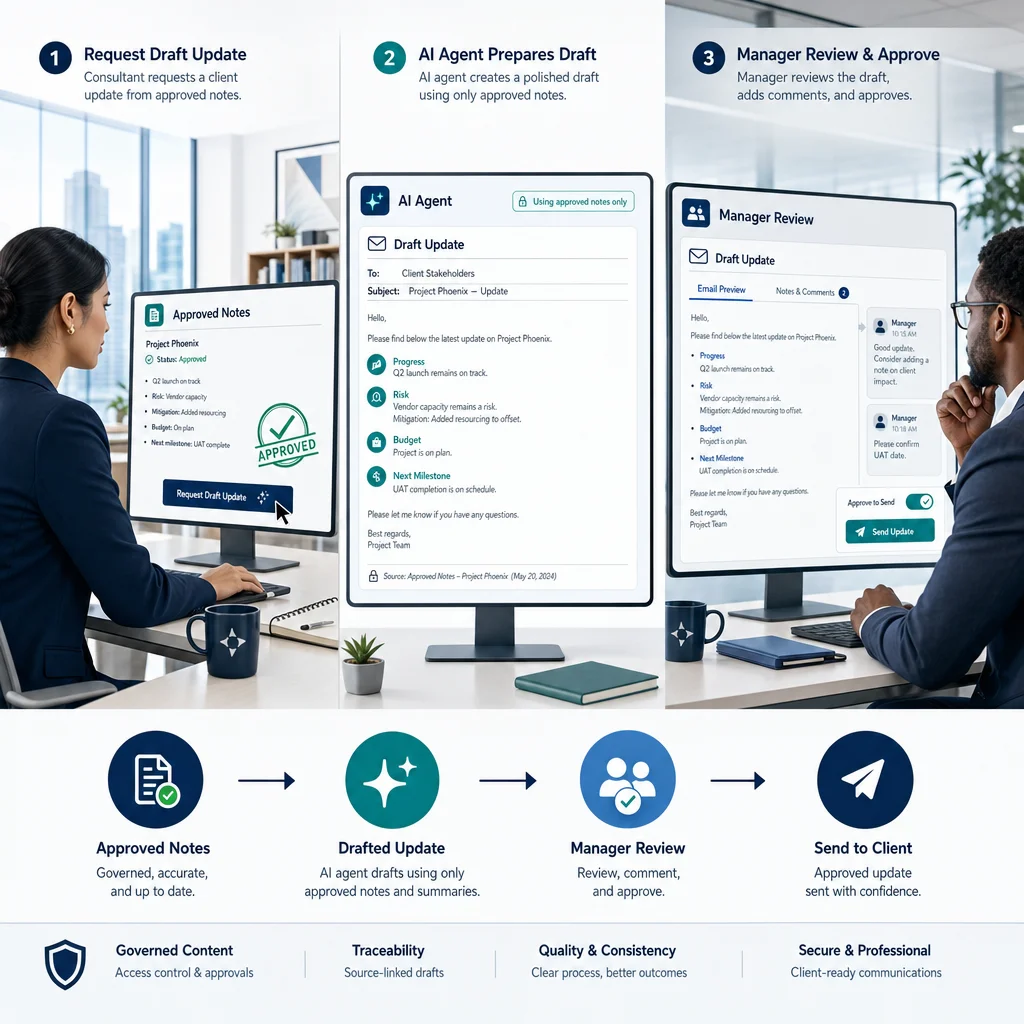
The firm creates two test accounts and uses fictional project notes. It checks whether the consultant can access only the assigned project, whether the agent stops before sending, and whether the manager’s decision can be found later.
The pilot fails if the manager can review a draft but cannot prevent the connected action. It also fails the firm’s audit requirement if the event record cannot identify the relevant user or decision.
What Should Buyers Check About Cost and Implementation?
The cost of an AI agent solution is more than its advertised entry price. Teams should check the plan required for governance, the number of users, consumption charges, connected services, and administration time. A lower entry price may not represent the cost of the configuration needed for a controlled workflow.
When you compare Sintra alternatives, request a quote for the same scenario from each vendor. Include the number of builders, regular users, administrators, and reviewers. Also describe expected agent activity and any connected systems.
| Cost Area | Question to Ask |
|---|---|
| Plan and seats | Which plan includes the required roles, approvals, and audit records? Is there a seat minimum? |
| Usage | Are agent runs, credits, model usage, or connected actions charged separately? |
| Supporting products | Are identity, monitoring, storage, or integration services required? |
| Implementation | Who configures permissions, tests controls, and maintains connections? |
| Evidence retention | Does longer retention or export require an additional service or plan? |
Do not assume a listed entry price includes governance features. Microsoft’s Copilot Studio pricing page, for example, distinguishes agent-building and consumption arrangements. Confirm the current terms for your region and deployment.
Define the Work Your Team Will Own
A vendor can supply a control, but someone in your organisation still needs to configure and maintain it. Assign an owner for each of these tasks:
- Approving new agent use cases.
- Granting and removing user access.
- Reviewing connected accounts.
- Deciding which actions require human approval.
- Checking logs when an incident or question arises.
- Retiring an agent that is no longer needed.
The right owner may be an operations lead in a small firm or a dedicated administrator in a larger organisation. What matters is that the responsibility is explicit.
When Is an AI Agent Platform Not the Right Fit?
An AI agent platform may not suit a task when the organisation cannot verify the required controls, cannot provide a reviewer, or cannot tolerate an incorrect action. A simpler workflow or a manually operated process may be more appropriate until the team can define access, review, and accountability.
An agent is not automatically the right choice just because a task is repetitive. Consider delaying deployment when:
- The required data cannot be used under your organisation’s policies.
- No one can explain which account will perform a connected action.
- The team cannot inspect or retain the evidence it needs.
- An irreversible action cannot be stopped for review.
- The vendor cannot demonstrate a mandatory requirement in the intended plan.
- The proposed workflow depends on an integration that has not been verified.
Separate a Drafting Pilot From an Action Pilot
A drafting pilot can be a useful first step. It allows the team to review output quality without immediately allowing the agent to make changes elsewhere.
An action pilot introduces additional questions. The team must understand the connected account, its privileges, the approval boundary, and the recovery process if something goes wrong.
Start with fictional or approved test data. Expand access only after the responsible people agree that the workflow and records meet the stated requirements. This approach does not eliminate risk, but it makes the decision easier to inspect.
Confirm the Limits of Protection
No vendor feature replaces a team’s own review of data handling and obligations. For each option, ask where information is stored, who can access records, how long data is retained, and which subprocessors or connected services are involved.
If a feature masks personal information in prompts, ask whether it also covers uploaded documents, logs, exports, and connected systems. Those are separate data paths. A control that covers one path should not be assumed to cover the others.
Key Takeaways
- Start with a real workflow and define who can request, review, and perform each action.
- Treat audit records, access controls, and approval steps as separate requirements.
- Compare LaunchLemonade, Microsoft Copilot Studio, Zapier, and Workato against the same test.
- Confirm plan availability, retention, and connected-system permissions before buying.
- Use a controlled pilot and do not average away a failed mandatory control.
Conclusion
The right AI agent choice is the one your team can operate and account for, not simply the one with the longest feature list. Test the permissions, approval points, and records against the work you actually intend to run.
If you want to discuss a professional-team use case, book a LaunchLemonade demo. Bring a sample workflow and your required controls so the discussion can focus on fit.
Frequently Asked Questions
Which Sintra Alternatives Offer Audit Trails?
LaunchLemonade, Microsoft Copilot Studio, Zapier, and Workato describe audit or monitoring capabilities. Their coverage, plan requirements, and configuration differ. Ask each vendor to show the exact record your team needs.
Do Sintra Alternatives Include Role-Based Access Controls?
Sintra alternatives should be assessed individually for role-based access and permission granularity. A workspace role may not control every agent, document, or connected action. Request a demonstration with the roles your team expects to use.
Does LaunchLemonade Include Audit Trails and Approvals?
LaunchLemonade’s available knowledge-base source describes audit trails on Pro and above. It also describes role-based access and approvals on Team and Enterprise. Check current plan availability and confirm the details for your workflow.
How Much Do Governed AI Agent Tools Cost?
Governed AI agent tools can involve seat, usage, integration, and administration costs. The entry plan may not include every control your team requires. Ask vendors for current pricing based on your intended configuration.
Who Might Not Need an AI Agent Alternative?
A solo user with a simple, low-risk task may not need a broader governance platform. An existing tool may already meet that user’s requirements. The decision changes when shared access, sensitive data, or connected actions require more oversight.
Is an Audit Trail Enough to Make AI Agent Use Safe?
An audit trail helps a team investigate activity, but it does not prevent every unwanted action. AI agent governance also needs appropriate permissions, review processes, and data handling. Test the controls together before expanding access.