
How to Measure AI Agent Performance: 5 Key Metrics
Most businesses deploy AI assistants and never check whether they’re actually working. Track these 5 metrics to know if your AI is earning its keep: resolution rate (target: 70%+), response accuracy (90%+), time saved per week (measure in hours), cost per interaction (compare to human cost), and customer satisfaction score (4.0+ out of 5). This post includes the exact formulas and benchmarks you need.
Why Do Most Businesses Fail to Measure AI Agent Performance?
Over 60% of small businesses that deploy an AI assistant never set up formal tracking for whether it’s actually helping. They launch it, feel good about being “innovative,” and move on.
The problem isn’t laziness. It’s that nobody tells business owners WHAT to measure. Most AI platforms give you a dashboard full of numbers (total messages, average response time, session counts) without explaining which numbers actually indicate success or failure.
You don’t need 20 metrics. You need 5 good ones that tell you whether your AI assistant is saving you time, saving you money, and keeping your clients happy.
What Is AI Agent ROI and How Do You Calculate It?
AI agent ROI measures the total value your assistant generates compared to what you pay for it. For most small businesses using platforms like LaunchLemonade, a well-configured assistant delivers 3-10x ROI within the first 90 days.
Here’s the formula:
AI Agent ROI = (Value Generated - Total Cost) / Total Cost x 100

Where:
- Value Generated = (Hours saved x Your hourly rate) + Revenue influenced
- Total Cost = Platform subscription + Setup time value + Maintenance time value
Example calculation:
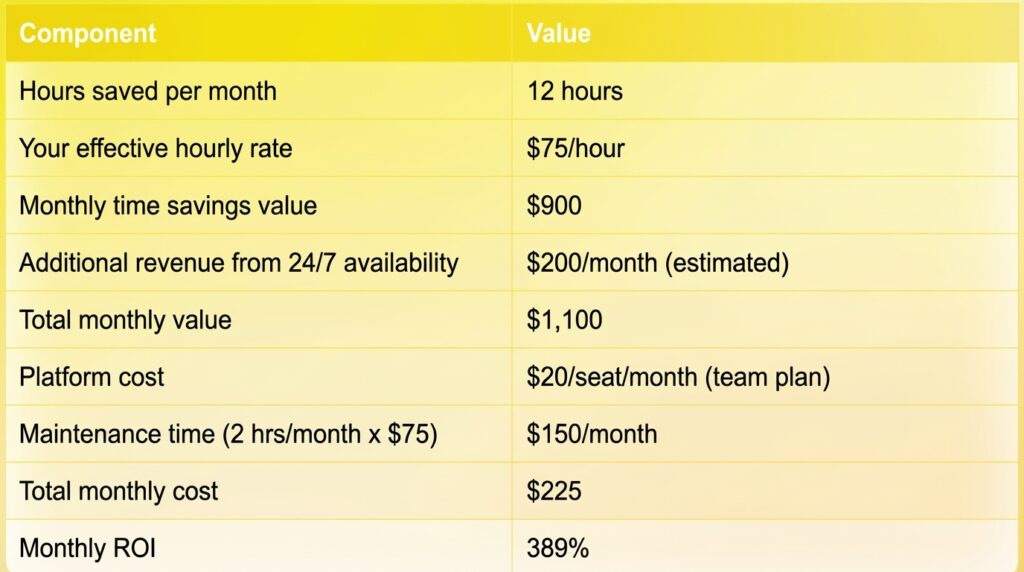
That means every dollar you spend on your AI assistant returns roughly $4.89 in value. Not a bad hire.
The important thing is to run this calculation with YOUR numbers, not hypotheticals. Track your time savings honestly for one month, and the ROI math becomes very clear, very fast.
Metric #1: What Is Resolution Rate and What Should It Be?
Resolution rate measures the percentage of conversations your AI assistant handles completely without needing human follow-up. It’s the single most important metric for understanding whether your assistant is actually doing its job.
Formula:
Resolution Rate = (Conversations fully resolved by AI / Total conversations) x 100
Benchmarks:
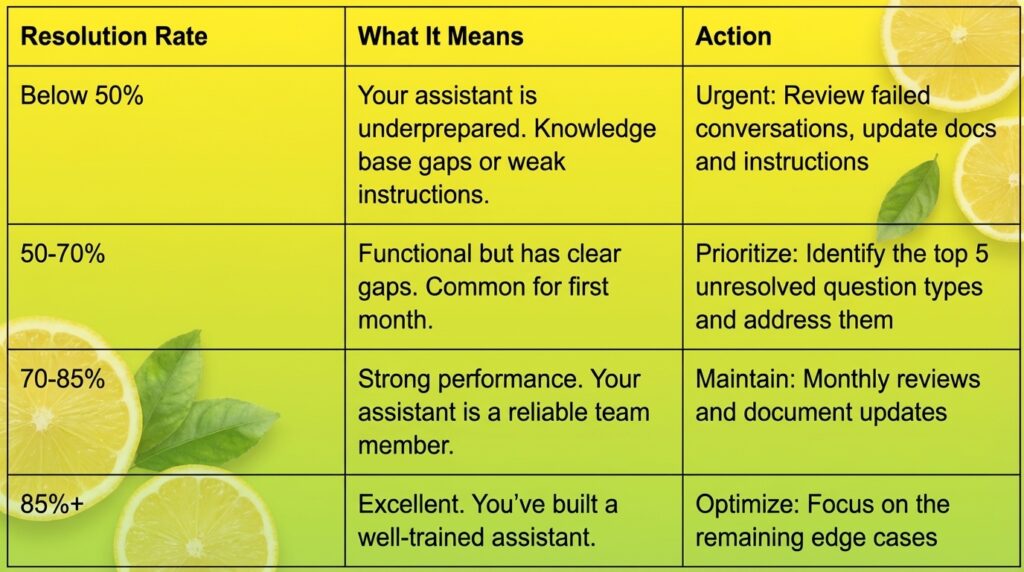
How to track it: Review conversations weekly. Mark each one as “resolved” (the person got their answer without needing a human) or “escalated” (a human had to step in). Most platforms, including LaunchLemonade, provide conversation logs and audit trails that make this straightforward.
Common reasons for low resolution rates:
- Missing information in the knowledge base
- Instructions that are too vague about scope
- No fallback process for questions outside the assistant’s domain
- Outdated documents that give wrong answers
If your resolution rate is below 70% after the first month, don’t assume the AI isn’t good enough. In most cases, the fix is better documents and clearer instructions, not a different tool.
Metric #2: How Do You Measure AI Response Accuracy?
Response accuracy is the percentage of your AI assistant’s answers that are factually correct and complete. This is different from resolution rate because an assistant can “resolve” a conversation with a wrong answer if the person doesn’t know to push back.
Formula:
Accuracy Rate = (Correct answers / Total answers audited) x 100
How to audit accuracy:
- Sample 20 conversations per week (or all of them if volume is low).
- Check each answer against your source documents. Is the information right? Is it complete? Is anything misleading?
- Score each answer:
- Correct (2 points): Factually accurate and complete
- Partially correct (1 point): Right direction but missing details or slightly off
- Incorrect (0 points): Wrong information, made-up details, or contradicts your documents
Benchmarks:

The accuracy-confidence connection:
Low accuracy usually comes from one of three causes:
- Knowledge gaps: The assistant doesn’t have the right documents. It’s guessing.
- Contradictory sources: Two documents give different answers. The assistant picks randomly.
- Weak guardrails: The assistant wasn’t told to admit when it doesn’t know something.
For businesses in regulated industries, accuracy isn’t just a performance metric. It’s a compliance requirement. If your AI assistant gives a client wrong information about financial products or legal obligations, the consequences go beyond a bad review. That’s why platforms with governance features (audit trails, data controls, compliance readiness) matter for accuracy tracking.
Metric #3: How Much Time Does an AI Agent Actually Save?
Most well-configured AI assistants save business owners 5-15 hours per week on tasks like answering repetitive questions, handling intake, and preparing documents. But you need to measure YOUR actual savings, not just trust the average.
How to measure time saved:
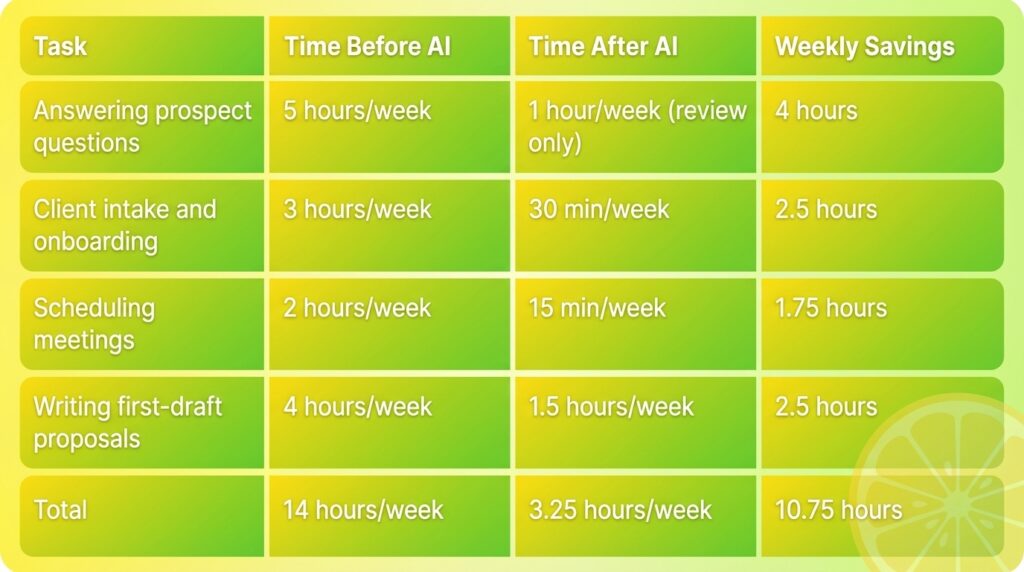
Method 1: The Before/After Comparison
Track how long specific tasks take you BEFORE deploying the assistant, then measure again after:
Method 2: The Conversation Multiplier
If you know how many conversations your assistant handles and how long each would take you manually:
Time Saved = (Conversations per week x Average minutes per manual conversation) / 60

Example: 80 conversations x 8 minutes each = 640 minutes = 10.7 hours/week
Why this metric matters for ROI: Time saved is only valuable if you do something productive with those hours. If your assistant saves you 10 hours per week and you use that time to close 2 more clients per month, the ROI calculation gets very compelling.
On platforms like LaunchLemonade, you can build an assistant in under 15 minutes with no code. That means your break-even time (setup time versus time saved) can be as short as the first day.
Metric #4: What Is the Cost Per AI Interaction?
Cost per interaction tells you exactly how much each conversation with your AI assistant costs you. For most small businesses using AI platforms, this number falls between $0.02 and $0.15 per interaction, compared to $5-15 for a human handling the same conversation.
Formula:
Cost per Interaction = Total Monthly AI Cost / Total Monthly Interactions

Where Total Monthly AI Cost includes:
- Platform subscription
- Any per-message or per-token fees
- Your maintenance time (valued at your hourly rate)
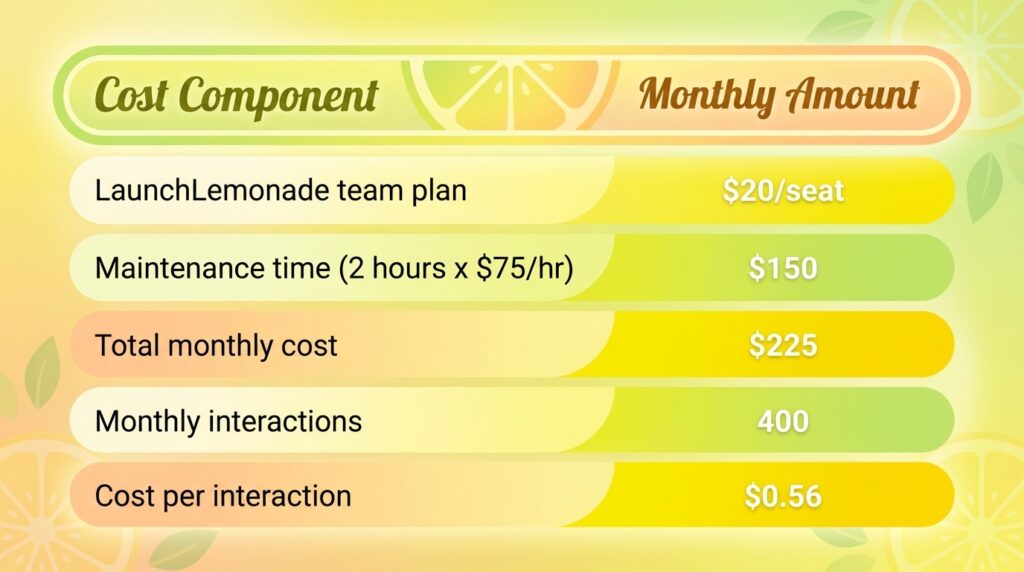
Example:
Now compare that to the alternative:
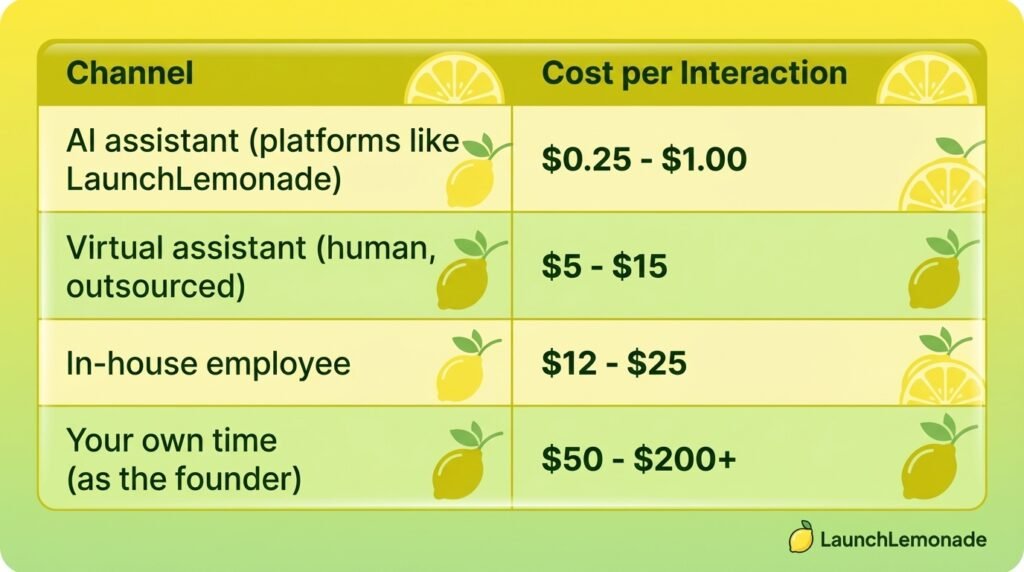
The math gets more dramatic at scale. If your assistant handles 400 interactions per month at $0.56 each versus you handling them at $75/hour (8 minutes each), that’s $224 versus $4,000. A 94% cost reduction.
Metric #5: How Do You Track Customer Satisfaction With an AI Agent?
Customer satisfaction with AI assistants is best measured through a simple 1-5 rating at the end of each conversation, targeting an average score of 4.0 or higher.
Three ways to collect satisfaction data:
Option 1: End-of-Conversation Rating
Add a simple “Was this helpful? Rate 1-5” prompt at the end of each conversation. This is the most common approach and gives you the most data.
Option 2: Follow-Up Survey
Send a brief survey to people who interacted with your assistant. Better for detailed feedback but lower response rates (expect 10-20%).
Option 3: Indirect Signals
Track behaviors that indicate satisfaction or dissatisfaction:
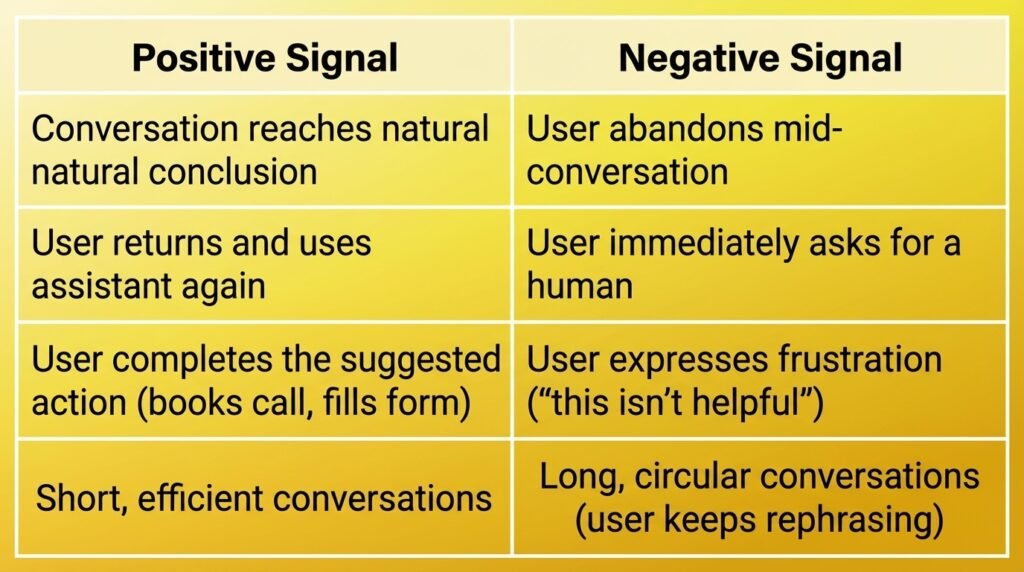
Benchmarks:
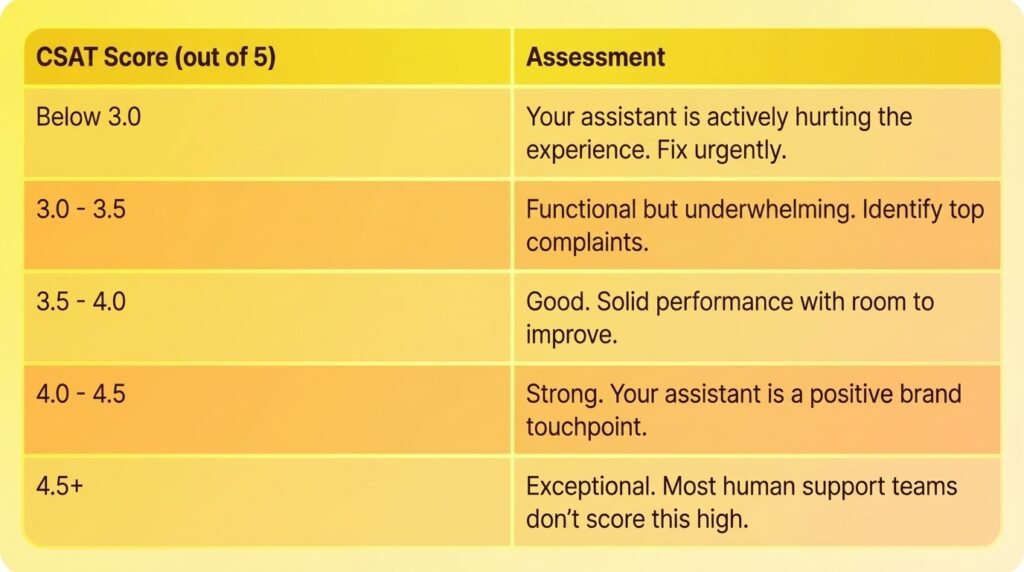
What drags satisfaction down:
- Generic, unhelpful answers (fix: better knowledge base)
- Can’t handle simple follow-up questions (fix: improve context handling)
- Robotic or cold tone (fix: update personality instructions)
- No easy way to reach a human when needed (fix: add escalation paths)
How Do You Build an AI Agent Performance Dashboard?
You don’t need fancy analytics software. A simple spreadsheet updated weekly covers everything you need for the first 6 months.
Here’s the dashboard template:
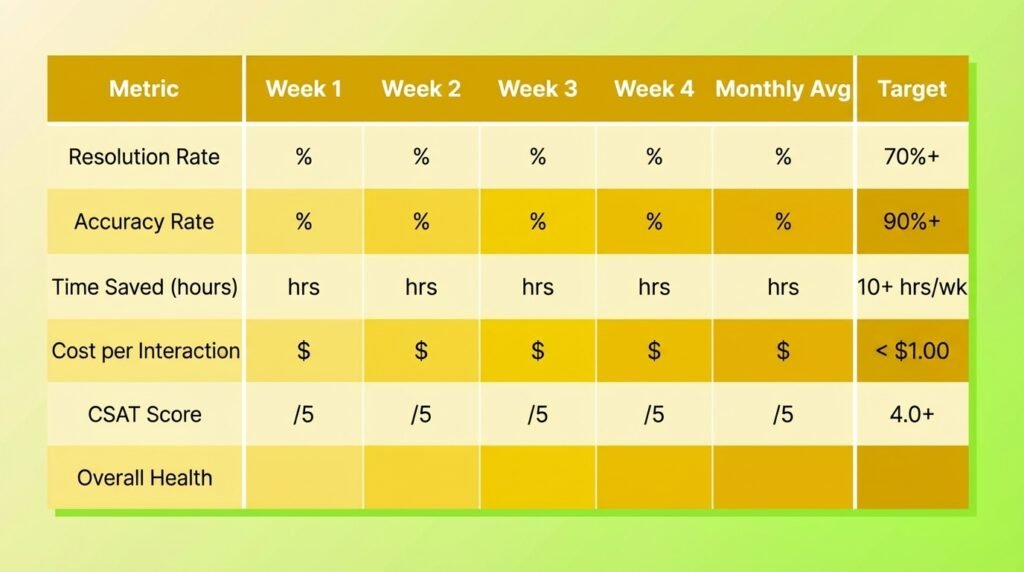
Weekly routine (20 minutes):
- Minutes 1-5: Pull conversation count and resolution numbers from your platform.
- Minutes 5-12: Audit 10-20 conversations for accuracy. Score each one.
- Minutes 12-15: Calculate time saved using your chosen method.
- Minutes 15-18: Check satisfaction scores or indirect signals.
- Minutes 18-20: Update your dashboard and note any patterns.
That’s 20 minutes per week to know whether your AI investment is paying off. Compare that to the hours you’d spend wondering, or worse, assuming everything is fine when it isn’t.
When Should You Be Worried About AI Agent Performance?
Pay attention to these warning signs that your assistant needs attention:
Red flags (act immediately):
- Accuracy drops below 80% for two consecutive weeks
- CSAT drops below 3.0
- Resolution rate falls more than 15 percentage points in a single week
- Users explicitly report incorrect information
Yellow flags (investigate within a week):
- Resolution rate plateaus below 70% despite updates
- Same types of questions keep failing
- Escalation rate increases month over month
- Users are abandoning conversations more frequently
The fix is almost never “get a better AI.” In 90%+ of cases, performance problems trace back to:
- Outdated or incomplete knowledge base
- Vague instructions without clear boundaries
- Missing escalation paths for complex questions
- Not enough testing before going live
On LaunchLemonade, you can update instructions, refresh your knowledge base, and re-test in under 5 minutes. Fast iteration is the real performance advantage.
Frequently Asked Questions
What is a good ROI for an AI agent?
A well-configured AI assistant typically delivers 3-10x ROI within the first 90 days. For a business paying $20/seat/month for a platform like LaunchLemonade, that means generating $225-$750 in monthly value through time savings, improved response times, and better client experience. If your ROI is below 2x after three months, review your knowledge base and instructions for gaps.
How many conversations does an AI agent need before you can measure performance?
You need at least 50 conversations to get statistically meaningful metrics. For most small businesses, that takes 1-3 weeks. Start measuring from day one, but don’t make major changes based on fewer than 50 data points. Early conversations are great for catching obvious problems, but you need volume to identify real patterns.
Should I compare my AI agent’s performance to human support?
Yes, but fairly. Humans are better at empathy, creative problem-solving, and handling emotional situations. AI assistants are better at consistency, availability (24/7 coverage), speed, and cost. The best comparison metric is cost per resolved interaction, where AI typically wins by 85-95%. The right approach is using AI to handle the 70-80% of conversations that are routine, so your human team focuses on the complex ones.
How do I measure AI agent performance for internal team use (not customer-facing)?
The same five metrics apply, just adjusted. Resolution rate becomes “task completion rate.” Accuracy measures whether the information provided was correct. Time saved is often even easier to measure for internal use because team members can directly report it. CSAT becomes an internal team satisfaction survey (monthly is sufficient). The target benchmarks are the same.
What tools do I need to track AI agent metrics?
For most small businesses, a spreadsheet and 20 minutes per week is all you need. Pull data from your AI platform’s conversation logs (most platforms provide these), manually audit a sample of conversations, and track the five metrics in a simple weekly dashboard. No additional software required for the first 6 months. After that, you might want automated analytics if volume exceeds 500+ monthly conversations.
Want to see these metrics in action? Build a free AI assistant on LaunchLemonade and start tracking what actually matters.