
What Is an AI Audit Trail?
An AI audit trail is a complete, timestamped log of every interaction within an AI system, recording inputs, outputs, data accessed, models used, and user identities so that any AI-generated action or response can be traced and reviewed after the fact. Think of it as a detailed receipt for every conversation your AI assistant has.
A proper AI audit trail captures six elements:
- Input: The exact question, instruction, or data submitted to the AI.
- Output: The exact response the AI generated.
- Data accessed: Which documents, knowledge bases, or files the AI referenced.
- Model identity: Which specific AI model processed the request.
- User identity: Who initiated the interaction (employee, client, or automated trigger).
- Timestamp: The precise time of every step in the process.
Without these six elements, you don’t have an audit trail. You have a chat log. The difference matters when a regulator, client, or attorney comes asking questions.
Why Do AI Audit Trails Matter for Businesses?
AI audit trails matter because they’re the only way to prove what your AI said, when it said it, and based on what information. Without them, you’re operating on faith.
Consider what happens when things go wrong. A client claims your AI assistant gave them incorrect financial information. A regulator asks how you’re using AI with customer data. A dispute arises over advice your chatbot provided. An employee uses AI to access data they shouldn’t have seen.
In each case, the first question is: “What exactly happened?” Without an audit trail, your answer is: “We don’t know.” That’s not an answer that satisfies clients, regulators, or courts.
Three specific reasons audit trails have moved from “nice to have” to “non-negotiable”:
- Liability protection. If your AI tells a client something incorrect and they act on it, you need evidence of exactly what was said. Without an audit trail, you can’t defend yourself. With one, you can show the context, identify the root cause, and demonstrate that your governance framework caught and corrected the issue.
- Regulatory compliance. Financial services firms, healthcare providers, and legal professionals are increasingly required to document AI use. The EU AI Act, SEC guidance on AI in financial services, and industry-specific frameworks all point toward audit trail requirements. Getting ahead of this protects your business.
- Quality improvement. Audit trails show you patterns. Which questions does your AI handle well? Where does it struggle? What types of queries lead to escalations? This data helps you improve your AI assistant’s performance over time, not through guesswork, but through evidence.
What Should an AI Audit Trail Capture?
A comprehensive AI audit trail captures every element needed to reconstruct an interaction: the input, output, context, model, user, and timing. Here’s what each element looks like in practice.
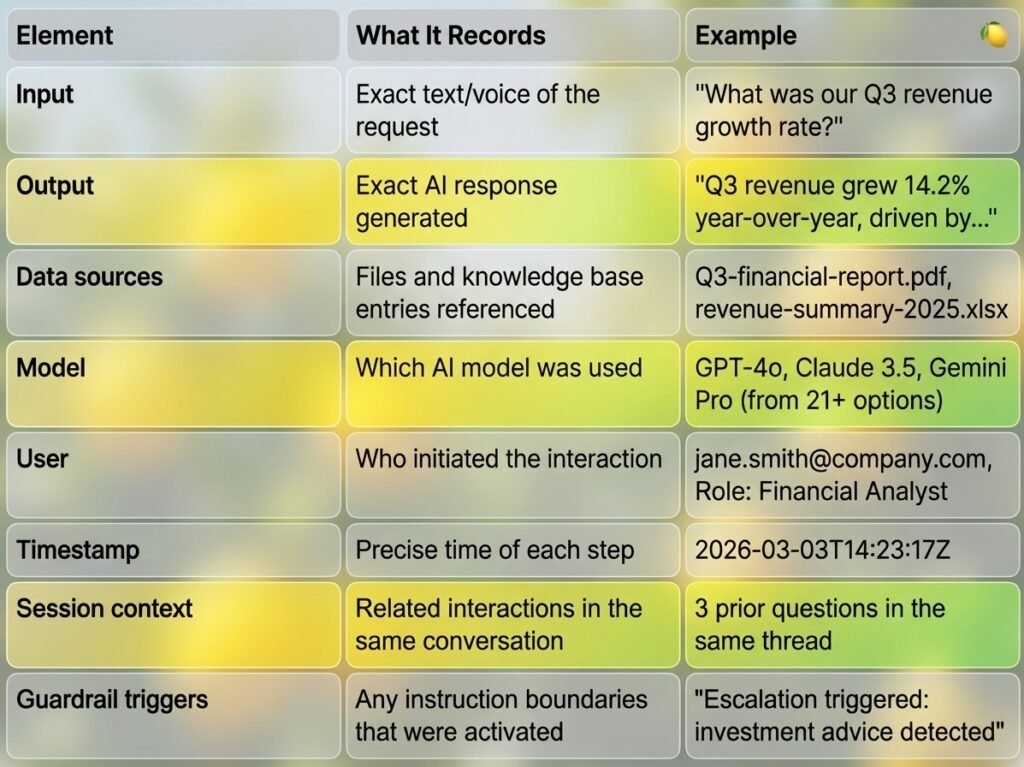
The key word is “exact.” Summaries don’t work for audit purposes. You need the full, unedited record. This is why audit trails must be immutable. Nobody should be able to modify or delete entries after the fact.
What Happens Without an AI Audit Trail?
Without an AI audit trail, businesses face five specific risks: unverifiable client interactions, compliance gaps, inability to investigate incidents, no quality improvement data, and exposure to liability claims they cannot defend against.
Let’s walk through a real-world comparison.
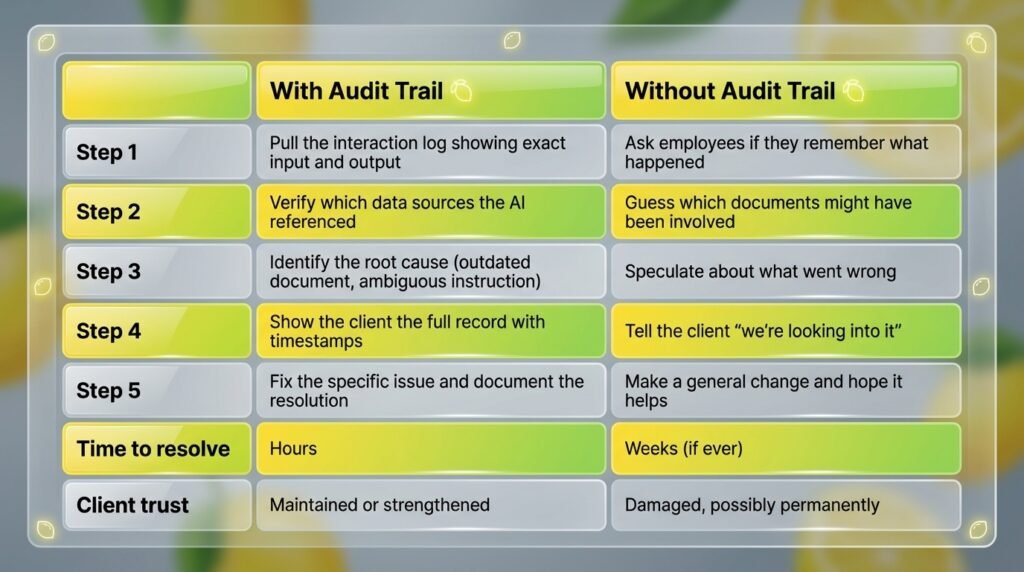
Scenario: A client disputes information your AI provided
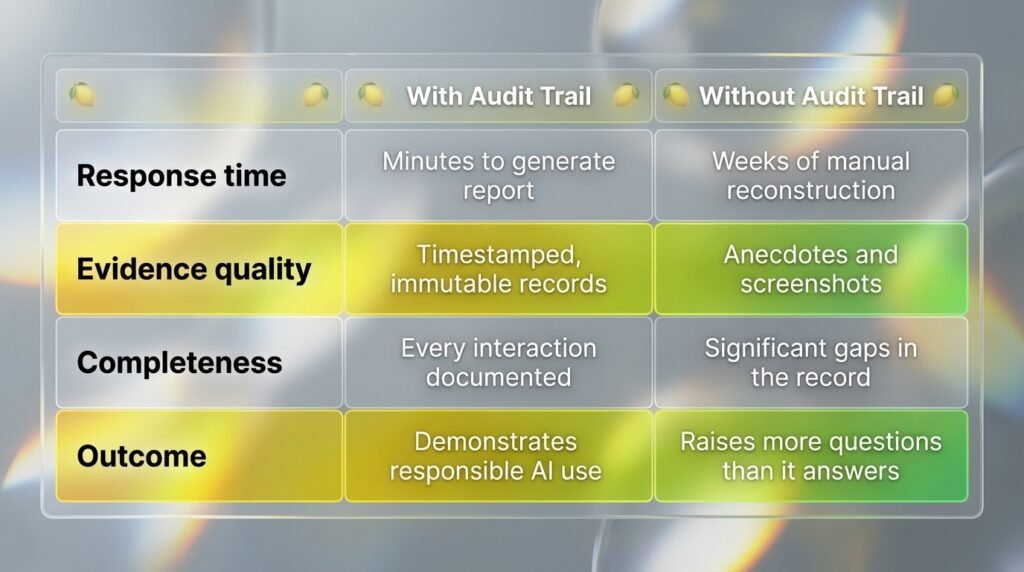
Scenario: A regulator asks about your AI practices
Scenario: An employee misuses an AI tool
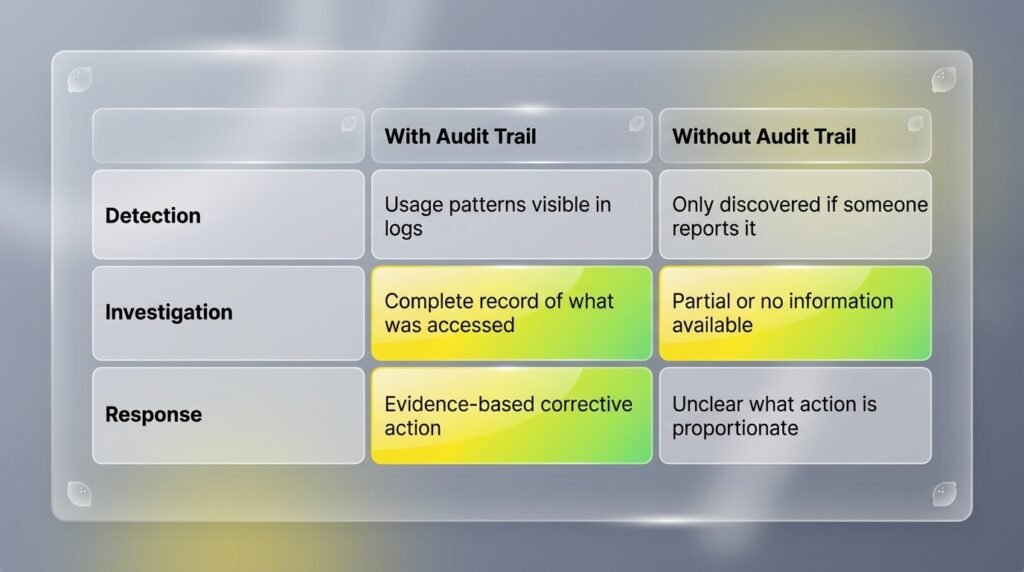
The pattern is clear. Audit trails turn every AI incident from a crisis into a manageable event with a clear path to resolution.
What Are the Legal Requirements for AI Audit Trails?
AI audit trail requirements are emerging across multiple regulatory frameworks, and the direction is clear: document how your AI handles data and what it tells people. While requirements vary by industry and jurisdiction, several frameworks already mandate or strongly recommend AI audit capabilities.
- EU AI Act (2024, enforcement phasing in through 2026): Requires “logging capabilities” for high-risk AI systems, including the ability to record events relevant for identifying national-level risks and facilitating post-market monitoring.
- SEC guidance on AI in financial services: Increasingly expects firms to demonstrate oversight and documentation of AI systems that interact with clients or influence financial decisions.
- GDPR (ongoing): Data processing records must include AI-based processing. The “right to explanation” for automated decision-making effectively requires audit trail data.
- Industry standards (SOC2, ISO 27001): Both frameworks evaluate whether organizations can demonstrate control over automated systems, including AI. Audit trails are a primary evidence mechanism.
- Professional liability standards: For CPAs, financial advisors, attorneys, and other licensed professionals, the duty of care extends to tools they use on behalf of clients. Documenting AI usage is becoming part of that standard.
The businesses implementing audit trails today aren’t just ahead of the regulations. They’re building the infrastructure that will be required tomorrow.
How Do You Set Up AI Audit Trails?
The simplest approach is to choose an AI platform that generates audit trails automatically, rather than trying to build logging into ungoverned tools. Here’s the practical path.
Option 1: Use a Governed Platform (Recommended)
Platforms built with governance in mind, like LaunchLemonade, create audit trails as a core feature. Every interaction is automatically logged with all six elements (input, output, data sources, model, user, timestamp). You don’t configure it. It just works.
Setup takes under 15 minutes:
- Create your AI assistant on the platform.
- Upload your knowledge base documents.
- Set instruction guardrails.
- Deploy to your website, phone line, or internal tools.
- Every interaction from this point forward is automatically audited.
Option 2: Build Custom Logging (Not Recommended for Most Businesses)
If you’re building custom AI integrations through APIs, you’ll need to implement logging at every step: capture the prompt, log the API call parameters, store the response, record the user session, and timestamp everything. This requires engineering resources, secure storage infrastructure, and ongoing maintenance.
For most businesses, this approach costs $10,000-$50,000+ to implement properly. And you still need to maintain it. A governed platform gives you the same capabilities for $25-$20/seat/month.
Option 3: Retrofit Existing Tools (Fragile)
Some businesses try to add audit trails to existing AI tools using middleware, logging services, or manual documentation. This approach creates gaps because it depends on the logging layer never failing and the AI tool not changing its behavior. It’s better than nothing, but it’s not reliable enough for compliance purposes.
What Makes a Good AI Audit Trail?
A good AI audit trail is immutable, complete, searchable, exportable, and accessible on demand. Here’s the quality standard your audit trail should meet.
- Immutable. Once an entry is created, it cannot be edited, deleted, or overwritten. This is essential for the audit trail to have legal or regulatory value.
- Complete. Every interaction is captured. No gaps, no sampling, no “we log 10% of interactions.” Completeness is binary.
- Searchable. You can find specific interactions by date, user, topic, model, or content. When a client asks “what did the AI tell me about my account on February 14th?”, you find the answer in seconds.
- Exportable. You can generate reports for auditors, regulators, or clients in standard formats (PDF, CSV, JSON).
- Accessible on demand. You don’t need to file a support ticket and wait 3 business days. The data is available whenever you need it.
- Retention-compliant. Audit trail data is retained for the period required by your industry’s regulations and your client agreements.
How Much Do AI Audit Trail Solutions Cost?
Governed AI platforms with built-in audit trails cost $20-$25 per month. Custom-built audit trail infrastructure costs $10,000-$50,000+ to develop and $500-$2,000 per month to maintain.
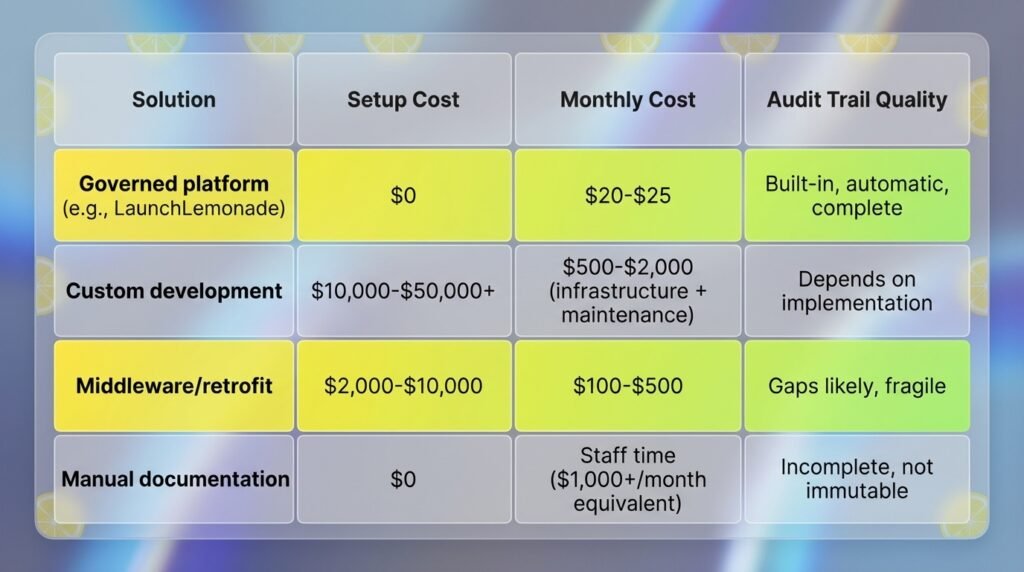
For most small and mid-sized businesses, the decision is straightforward. A governed platform with 21+ LLM options, no-code setup, and automatic audit trails delivers enterprise-grade compliance at a fraction of enterprise pricing.
How Do AI Audit Trails Work with Multi-Agent Workflows?
In multi-agent workflows where several AI assistants collaborate on a task, the audit trail must track each assistant’s contribution individually while maintaining the thread that connects them. This creates a chain of custody for the AI’s work.
For example, say you have one assistant that gathers financial data, a second that analyzes it, and a third that drafts a summary report. The audit trail should show: what the first assistant collected and from where, what the second assistant produced as analysis, and what the third assistant wrote as the final output. Each step is logged individually, but the thread connecting them is preserved.
This is especially important for compliance in regulated industries where you need to verify not just the final output, but the entire reasoning chain. Platforms like LaunchLemonade support multi-agent workflows with connected audit trails, so the full process is documented automatically.
Frequently Asked Questions
What is an AI audit trail in simple terms?
An AI audit trail is a detailed log of every interaction with your AI system. It records what was asked, what the AI responded, which data it referenced, which AI model was used, who was involved, and when it all happened. Think of it as a receipt for every AI conversation that you can review, search, and share when needed.
Are AI audit trails legally required?
Requirements vary by industry and jurisdiction, but the trend is clear. The EU AI Act requires logging for high-risk AI systems. Financial regulators expect documentation of AI use with clients. Professional liability standards increasingly require documenting the tools used on behalf of clients. Even where not yet legally mandated, audit trails are becoming the standard of responsible AI use.
How long should AI audit trail data be retained?
Retention periods depend on your industry. Financial services typically require 5-7 years. Healthcare records may need 6-10 years depending on jurisdiction. Legal matters may require indefinite retention during active cases. Your AI platform should support retention periods that match your industry’s requirements.
Can audit trails be implemented on existing AI tools?
In theory, yes, through middleware or custom logging. In practice, retrofitting audit trails onto ungoverned AI tools creates gaps and fragility. The most reliable approach is using a governed platform like LaunchLemonade where audit trails are built into the core architecture and every interaction is logged automatically.
How do AI audit trails differ from regular system logs?
Regular system logs capture technical events (server requests, error codes, performance metrics). AI audit trails capture business-relevant information (what was asked, what was answered, what data was used, who was involved). System logs help engineers debug problems. AI audit trails help businesses demonstrate accountability, investigate incidents, and satisfy compliance requirements.
Ready to give every AI interaction a verifiable record? Build your first governed assistant with automatic audit trails on LaunchLemonade in under 15 minutes.