
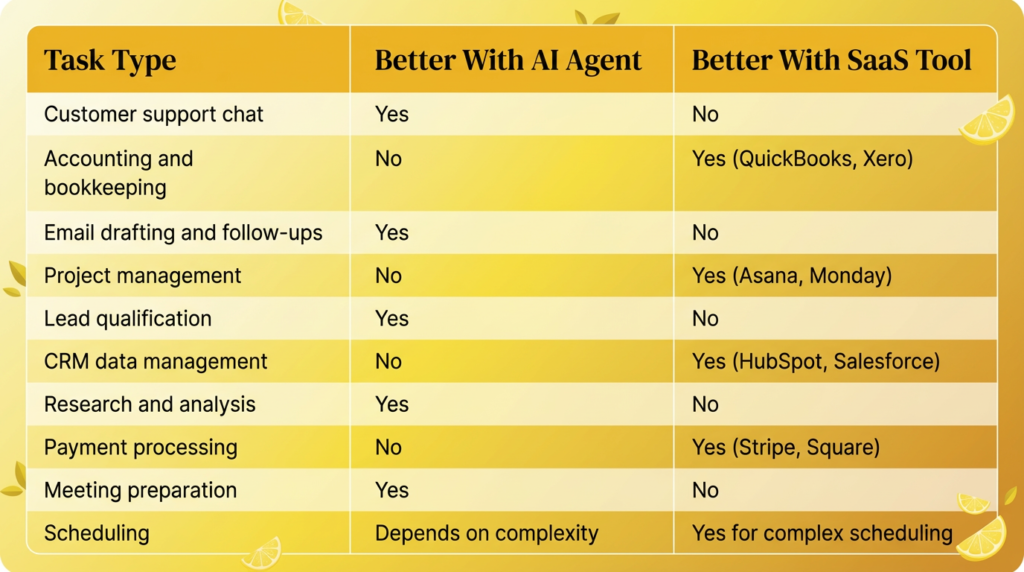
AI agents do not replace all your SaaS tools, but they can replace several and make the rest more effective. The sweet spot: use AI agents for tasks that require understanding, judgment, and natural language (client communication, research, content drafting). Keep SaaS tools for structured data processing (accounting, project management, CRM). For many small businesses, an AI agent platform like LaunchLemonade at $25/month can replace $200-500/month in scattered SaaS subscriptions.
Should You Replace SaaS Tools With AI Agents?
You should replace some SaaS tools with AI agents and keep others. The key is understanding which category each tool falls into.
Replace with AI when the tool’s main job is understanding language, generating content, or making judgment calls. A chatbot widget you are paying $49/month for? An AI agent does it better. A templated email follow-up tool at $29/month? An AI assistant writes more personalized messages.
Keep the SaaS tool when it handles structured data, complex integrations, or regulatory requirements. Your accounting software, project management platform, and CRM are purpose-built for their jobs. AI enhances them but does not replace them.
What SaaS Tools Can AI Agents Replace?
Here are the categories where AI agents deliver equal or better results at lower cost.
1. Live Chat and Chatbot Tools ($30-100/month saved)
Traditional live chat tools like Intercom, Drift, or Zendesk chat provide scripted responses and route conversations to humans. An AI agent trained on your knowledge base handles nuanced questions, works 24/7, and costs less than most chat subscriptions.
2. Email Sequence Tools ($20-80/month saved)
Tools like Mailshake or Lemlist send templated follow-up emails. An AI assistant drafts personalized messages that reference specific client details instead of filling in [FIRST_NAME] placeholders.
3. FAQ and Knowledge Base Tools ($20-60/month saved)
Platforms like Helpjuice or Document360 create searchable FAQ databases. An AI agent does the same thing but with natural conversation instead of search-and-browse. Customers ask questions in their own words and get direct answers.
4. Basic Research Tools ($30-100/month saved)
If you are paying for research subscriptions primarily to summarize information, an AI research agent can pull from your uploaded documents and produce summaries, briefings, and analysis at a fraction of the cost.
5. Content Brief and Outline Tools ($20-50/month saved)
Dedicated content planning tools often overlap with what an AI assistant can do. Give your assistant your content strategy document and it generates briefs, outlines, and research summaries on demand.
Total potential savings: $120-390/month in SaaS subscriptions replaced by a single AI agent platform at $20-25/month.
What SaaS Tools Should You Keep?
Some tools do things AI agents cannot do well. Keep these:
- Accounting software (QuickBooks, Xero, FreshBooks). These handle tax calculations, regulatory compliance, bank reconciliation, and financial reporting. AI can help you prepare for tax season, but it should not manage your books.
- Project management (Asana, Monday, Notion). Structured task tracking, Gantt charts, team assignments, and workflow automation are purpose-built SaaS strengths.
- CRM platforms (HubSpot, Salesforce). Managing pipelines, tracking deals, and storing customer history in a structured database is what CRMs are built for. AI can enhance your CRM usage (like drafting emails from CRM data) but should not replace the CRM itself.
- Payment processing (Stripe, Square). Never put AI between you and money processing. Use purpose-built, PCI-compliant payment tools.
How Do AI Agents and SaaS Tools Work Together?
The most effective setup is not AI OR SaaS. It is AI AND SaaS, each doing what it does best.
Example workflow for a consulting firm:
- CRM (SaaS) stores the client’s contact information, deal stage, and history
- AI agent drafts a personalized follow-up email using CRM context
- Project management tool (SaaS) tracks deliverables and deadlines
- AI agent prepares a meeting briefing summarizing project status
- Accounting software (SaaS) generates the invoice
- AI agent drafts the email to send alongside the invoice
Each tool handles what it is best at. The AI agent is the connective tissue that makes your entire stack more effective.
How Do You Decide What to Replace?
Use this three-question test for every SaaS tool on your bill:
Question 1: Is the core job language-based? If the tool mainly helps you write, respond to, or understand text, an AI agent probably does it better. If it manages structured data, transactions, or integrations, keep the SaaS tool.
Question 2: Would a human assistant have done this job before SaaS existed? Client communication, research, scheduling, and drafting are tasks humans used to handle. AI agents excel at these. Accounting, payment processing, and database management are tasks that always required specialized tools.
Question 3: Is the monthly cost justified by the output? If you are paying $50/month for a tool you use 3 times a month, an AI agent at $25/month that handles this plus 10 other tasks is a better investment.
Frequently Asked Questions
Can an AI agent really replace multiple SaaS tools?
Yes, for language-based tasks. A single AI assistant on a platform like LaunchLemonade can handle customer support chat, email drafting, research, meeting prep, and FAQ responses. That potentially replaces 3-5 separate tool subscriptions. For structured data tasks (accounting, project management, CRM), keep your existing tools.
How much can I save by switching from SaaS tools to AI agents?
Most small businesses can save $120 to $390/month by replacing redundant SaaS subscriptions with an AI agent platform. The biggest savings come from replacing live chat tools, email sequence platforms, and basic research subscriptions.
Will AI agents integrate with my existing SaaS tools?
Integration capabilities vary by platform. Many AI agent builders can connect to popular SaaS tools through APIs or Zapier. On LaunchLemonade, you can build agents that complement your existing tools by handling the language-based tasks while your SaaS stack handles the structured work.
Is it risky to replace SaaS tools with AI?
The risk is low for language-based tools (chat, email drafting, research). Start by running the AI agent alongside your existing tool for two weeks. Compare quality and coverage. If the AI agent meets or exceeds the SaaS tool’s performance, cancel the subscription. Never replace critical infrastructure (payments, accounting, security) with AI.