

The difference between an AI assistant that saves you 10+ hours per week and one that generates useless output comes down to how you write your instructions. Use specific role definitions, clear boundaries, real examples, and explicit output formats. This post gives you 7 real instruction templates you can copy and adapt today.
Why Do Most AI Agent Instructions Fail?
Most AI assistant instructions fail because they’re too vague. Telling your assistant to “help with customer service” is like hiring someone and saying “do stuff.” You’d never do that with a human team member, and it doesn’t work with AI either.
The root problem is that business owners write instructions the way they think, not the way an AI assistant processes information. Specific, structured instructions produce 3-5x better outputs than vague ones, based on what we see across platforms like LaunchLemonade where thousands of businesses build custom assistants.
Good instructions have four parts: a clear role, defined boundaries, real examples, and a specified output format. Miss any one of those, and your results degrade fast.
What Makes a Good AI Agent Instruction Set?
A good instruction set gives your assistant everything it needs to act like a competent team member on day one. Think of it as the onboarding document you’d hand to a new hire.
Here’s what separates instructions that work from instructions that waste your time:
Element Checklist Item
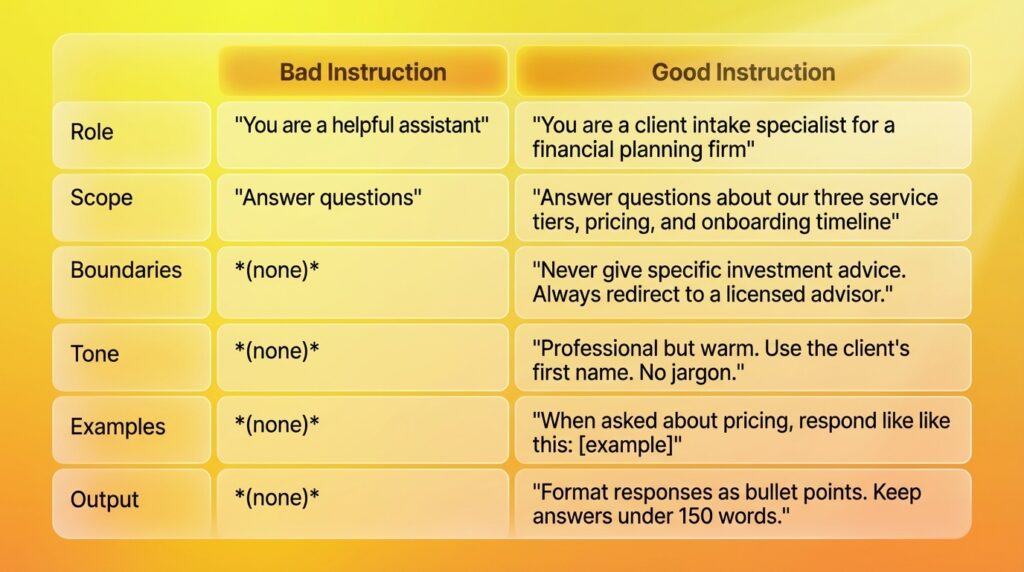
The pattern is clear. Good instructions are specific about what, how, and what NOT to do.
How Do You Define an AI Agent’s Role and Personality?
Start every instruction set with a one-sentence role definition that includes who the assistant is, who it serves, and what it does. This single sentence shapes every response your assistant generates.
Bad example:
“You are an AI assistant for my company.”
Good example:
“You are a project intake coordinator for Riverside Design Studio, a branding agency that works with food and beverage startups. You help potential clients understand our services, collect project details, and schedule discovery calls.”
Notice the difference. The good version tells the assistant its job title, the company context, the target audience, and the three specific things it should do.
After the role definition, add personality guidelines. Two to three sentences is enough. Something like: “You’re friendly and straightforward. You use simple language. You never oversell our services.”
On platforms like LaunchLemonade, you can pair these instructions with a knowledge base of your actual company documents, so your assistant isn’t guessing about your services or pricing.
What Are the Most Common AI Instruction Mistakes?
The biggest mistakes fall into three categories: being too vague, being too rigid, and forgetting to set boundaries.
Mistake #1: Vague instructions “Help customers with their questions” gives your assistant no context. It doesn’t know your products, your policies, or your tone. You’ll get generic answers that could come from any business.
Mistake #2: Overly rigid scripts Writing out every possible conversation word-for-word defeats the purpose. Your assistant can handle natural language. Give it guidelines and examples, not a 50-page script.
Mistake #3: No boundaries Without explicit limits, your assistant might promise discounts you don’t offer, give advice outside your expertise, or share information you’d rather keep private. Always define what the assistant should NOT do. This is especially important for businesses in regulated industries where a wrong answer has real consequences.
How Should You Structure AI Agent Instructions? (Step-by-Step)
Follow this 6-part structure and you’ll cover everything your assistant needs. Most people can write a solid instruction set in 15 to 30 minutes using this framework.
Step 1: Define the Role (1-2 sentences)
State who the assistant is and what it does. Be specific about the business context.
You are the first-contact support specialist for GreenLeaf Accounting,
a firm that provides bookkeeping and tax preparation for small businesses
with under $2M in annual revenue.
Step 2: Define the Audience (1-2 sentences)
Tell the assistant who it’s talking to. This changes how it communicates.
You speak with small business owners who are not financial experts.
They often feel overwhelmed by tax obligations and need reassurance
alongside clear answers.
Step 3: List Core Tasks (3-7 bullet points)
Be explicit about what the assistant should do. Prioritize the list.
Your primary tasks:
- Answer questions about our three service packages and pricing
- Collect basic business information for new client intake
- Schedule consultation calls using our Calendly link
- Explain common tax deadlines and filing requirements
- Redirect complex tax strategy questions to our senior accountant
Step 4: Set Boundaries (3-5 rules)
This is where most people skip, and it’s where most problems start.
Rules you must follow:
- Never provide specific tax advice or tax planning recommendations
- Never guarantee specific refund amounts or tax savings
- Never share other clients' information, even anonymously
- If you don't know the answer, say "Let me connect you with our team"
  and collect their contact information
- Never make up information about our services or pricing
Step 5: Provide Examples (2-3 exchanges)
Examples are the single most effective way to improve output quality. Show, don’t just tell.
Example interaction:

Client: "How much do you charge for bookkeeping?"
You: "Great question! Our bookkeeping packages start at $350/month for
businesses with up to 100 transactions. For businesses with higher volume,
we offer our Growth package at $650/month. Would you like me to help figure
out which tier fits your business? I'd just need a rough idea of your
monthly transaction count."
Step 6: Specify Output Format (1-3 rules)
Control how responses look. This matters more than people think.
Response formatting:
- Keep answers under 200 words unless the question requires more detail
- Use bullet points for lists of 3+ items
- Always end with a question or clear next step
- Use the client's name when they've provided it
Can You Show Me Real AI Agent Instruction Examples?
Here are 7 ready-to-use instruction templates across different business types. Copy these and customize the details for your business.
Example 1: Client Intake Assistant (Service Business)
Role: You are the intake coordinator for [Business Name], a [type] firm
serving [audience]. You collect project requirements and qualify leads.

Tasks:
- Greet visitors and ask about their project needs
- Collect: name, email, company, project type, budget range, timeline
- Answer FAQs about our services (see knowledge base)
- Schedule discovery calls via [calendar link]

Boundaries:
- Don't quote custom pricing (direct to discovery call)
- Don't promise specific deliverables or timelines
- Don't discuss competitor comparisons

Tone: Professional, efficient, warm. No jargon.

Output: Use short paragraphs. Ask one question at a time.
Example 2: Knowledge Base Q&A (Internal Team)
Role: You are the internal knowledge assistant for [Company].
You help team members find information from our company docs.

Tasks:
- Answer questions about company policies, processes, and tools
- Reference specific documents when possible
- Help onboard new hires by walking them through key processes

Boundaries:
- Only reference information from the uploaded knowledge base
- Say "I don't have that information in my documents" when unsure
- Don't make assumptions about policies not in the docs
- Don't share salary, HR, or confidential financial information

Output: Cite the source document. Keep answers concise.
Example 3: Content Research Assistant
Role: You are a research assistant for [Company]'s content team.
You help prepare background research for blog posts and reports.

Tasks:
- Summarize key points from uploaded research documents
- Identify statistics, quotes, and data points relevant to the topic
- Suggest content angles and outline structures
- Flag gaps where additional research is needed

Boundaries:
- Don't generate fake statistics or fabricated quotes
- Always note when information might be outdated
- Don't write final copy (just research and outlines)

Output: Use headers and bullet points. Include source references.
Example 4: Customer Support Tier 1
Role: You handle first-contact support for [Product/Service].
You resolve common issues and escalate complex ones.

Tasks:
- Troubleshoot the top 10 common issues (see knowledge base)
- Guide users through account setup and basic features
- Process simple requests (password resets, plan changes)
- Collect issue details for tickets that need human review

Boundaries:
- Never process refunds over $100 (escalate to team)
- Never access or discuss another customer's account
- If the issue isn't in your knowledge base, create a ticket
- Never say "I'm just an AI" -- say "Let me connect you with
  a specialist who can help with that"

Tone: Helpful, patient, solutions-focused. Match the customer's energy.
Example 5: Meeting Prep Assistant
Role: You prepare meeting briefings for [Your Name/Role].

Tasks:
- Summarize recent communications with the meeting participant
- Pull relevant project status from uploaded documents
- Draft 3-5 talking points for the meeting
- Suggest 2-3 questions to ask

Output: Format as a one-page briefing with clear sections.
Keep the entire briefing under 400 words.
Example 6: Proposal Draft Assistant
Role: You draft initial client proposals for [Company].

Tasks:
- Generate proposal drafts using our template structure
- Pull relevant case studies from the knowledge base
- Suggest pricing based on project scope (reference pricing doc)
- Create project timeline estimates

Boundaries:
- Mark all pricing as "DRAFT -- REVIEW REQUIRED"
- Never finalize proposals without human review
- Don't guarantee specific results or ROI figures

Output: Follow the proposal template in the knowledge base.
Include sections: Overview, Approach, Timeline, Investment, Next Steps.
Example 7: Lead Qualification Assistant
Role: You qualify inbound leads for [Company]'s sales team.

Tasks:
- Ask qualifying questions: budget, timeline, decision process
- Score leads as Hot (ready to buy), Warm (interested), or Cold
- Book meetings for Hot leads
- Send relevant resources to Warm leads
- Politely decline Cold leads with helpful alternatives

Boundaries:
- Don't pressure or hard-sell
- Don't discuss competitor weaknesses
- Don't promise capabilities we don't have

Output: After each conversation, generate a lead summary card:
Name, Company, Score, Key Needs, Recommended Next Step.
How Do You Test and Improve AI Agent Instructions?
Writing instructions is step one. Testing them is where the real quality comes from. Plan to revise your instructions at least 3 times in the first week.
Testing process:
- Run 10 test conversations covering different scenarios. Try normal questions, edge cases, and questions outside the assistant’s scope.
- Check boundary compliance. Did the assistant ever break a rule? If so, make the boundary more explicit.
- Rate response quality. Score each response 1-5 on accuracy, tone, and helpfulness. Anything below a 3 means the instructions need work.
- Ask real users. Put it in front of 2-3 actual customers or team members. Watch where they get confused or frustrated.
On no-code platforms like LaunchLemonade, you can update instructions and test changes in under 5 minutes, which means you can iterate fast without waiting on a developer. You also get audit trails showing exactly what your assistant said, so you can pinpoint where instructions need tightening.
The goal isn’t perfection on day one. It’s building instructions that get measurably better every week.
What Tools Help You Build AI Agents With Custom Instructions?
No-code AI builders let you create custom assistants with specific instructions, connect them to your business knowledge, and deploy them in under 15 minutes. The best platforms include:
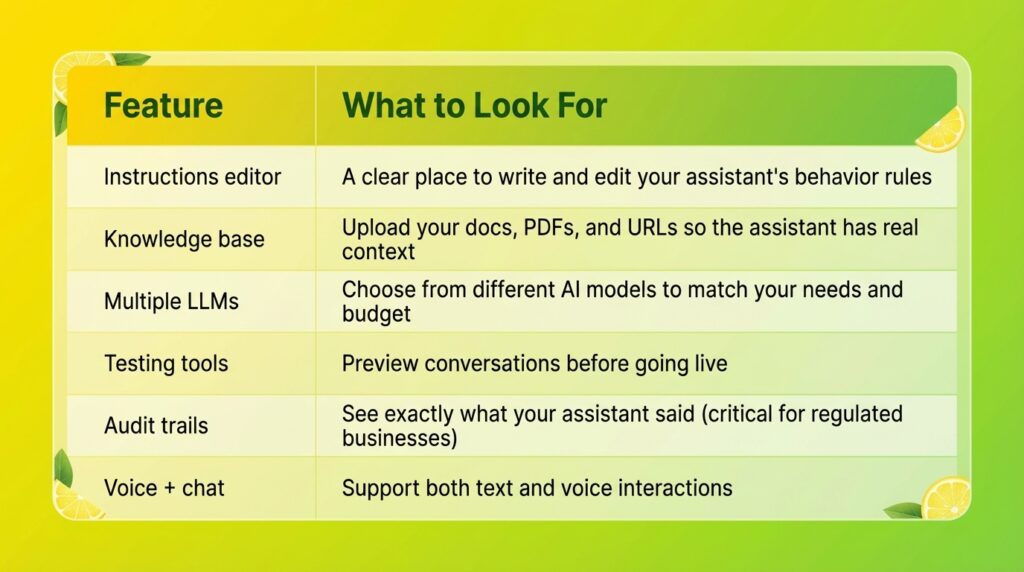
LaunchLemonade offers all of these with 21+ LLMs to choose from, a built-in knowledge base, and governance features for businesses that need compliance-ready AI. Plans start at $25/month for personal use.
Frequently Asked Questions
How long should AI agent instructions be?
Effective instructions are typically 200-500 words for most business use cases. The key is being specific, not lengthy. A 300-word instruction set with clear role definition, boundaries, and examples will outperform a 2,000-word document full of vague guidelines. Focus on the six elements: role, audience, tasks, boundaries, examples, and output format.
Do I need to know how to code to write AI agent instructions?
No. Writing good AI instructions is closer to writing a job description than writing code. If you can describe what you want a new hire to do on their first day, you can write effective AI instructions. No-code platforms like LaunchLemonade let you build and deploy a fully functional assistant in under 15 minutes with just natural language instructions.
How often should I update my AI agent’s instructions?
Review your instructions weekly for the first month, then monthly after that. Look at conversation logs to find patterns: questions the assistant handles poorly, boundaries it breaks, or common requests it doesn’t know how to address. Each revision should fix one or two specific problems, not rewrite everything at once.
What’s the difference between AI agent instructions and prompt engineering?
Instructions are the permanent behavior rules your assistant follows in every conversation. Prompt engineering typically refers to crafting individual queries for one-time outputs. Think of instructions as the employee handbook and prompts as individual task assignments. For business AI assistants, well-written instructions matter far more than clever individual prompts.
Can I use the same instructions across different AI models?
The core structure works across models, but you may need small adjustments. Different LLMs interpret instructions slightly differently. Platforms with multiple LLM options (like LaunchLemonade’s 21+ models) let you test the same instructions across different models to find the best fit for your specific use case.
Ready to build your first AI team member? Try LaunchLemonade free and have a working assistant in under 15 minutes.



